150 lines
7.1 KiB
Markdown
150 lines
7.1 KiB
Markdown

|
# Heartbeat
|
|||
|
|
|
|||
|
|
In QwenPaw, **heartbeat** means: on a fixed interval, ask QwenPaw the
|
|||
|
|
“questions” you wrote in a file, and optionally send the QwenPaw’s reply to
|
|||
|
|
**the channel where you last chatted**. Good for “regular check-ins, daily
|
|||
|
|
digests, scheduled reminders” — QwenPaw runs without you sending a
|
|||
|
|
message.
|
|||
|
|
|
|||
|
|
With **multiple agents**, each agent has its own **HEARTBEAT.md** and
|
|||
|
|
**heartbeat** settings under that agent’s workspace. You can also turn heartbeat
|
|||
|
|
on or off and change the interval in the [Console](./console) (**Control →
|
|||
|
|
Heartbeat**).
|
|||
|
|
|
|||
|
|
If you haven’t read [Introduction](./intro), skim the short notes there on
|
|||
|
|
heartbeat and channels.
|
|||
|
|
|
|||
|
|
---
|
|||
|
|
|
|||
|
|
## How heartbeat works
|
|||
|
|
|
|||
|
|
1. In the current agent’s workspace there is a **heartbeat query file** (default
|
|||
|
|
name **HEARTBEAT.md**; rename with env **`QWENPAW_HEARTBEAT_FILE`**). Its
|
|||
|
|
content is **what to ask QwenPaw on each run** (one or more paragraphs; QwenPaw
|
|||
|
|
treats it as one user message).
|
|||
|
|
2. When **`enabled` is true** in config, the system runs on your **every**
|
|||
|
|
value (**interval string** or **five-field cron**): read that file → send as
|
|||
|
|
the user message → QwenPaw replies.
|
|||
|
|
3. **Whether the reply goes to a channel** is set by **target**:
|
|||
|
|
- **main** — Run QwenPaw only; don’t send the reply to any channel (e.g. local
|
|||
|
|
self-check, logs).
|
|||
|
|
- **last** — Send the reply to the **channel/session where you last talked
|
|||
|
|
to QwenPaw** (e.g. if you last used DingTalk, the heartbeat reply goes to
|
|||
|
|
DingTalk).
|
|||
|
|
|
|||
|
|
You can also set **active hours**: heartbeat only runs in that daily window
|
|||
|
|
(e.g. 08:00–22:00).
|
|||
|
|
|
|||
|
|
---
|
|||
|
|
|
|||
|
|
## Step 1: Write HEARTBEAT.md
|
|||
|
|
|
|||
|
|
**Path (multi-agent, usual case):**
|
|||
|
|
`<QWENPAW_WORKING_DIR>/workspaces/<agent_id>/HEARTBEAT.md`.
|
|||
|
|
Default `QWENPAW_WORKING_DIR` is `~/.qwenpaw` (override with **`QWENPAW_WORKING_DIR`**);
|
|||
|
|
`<agent_id>` is the current agent id (e.g. `default`).
|
|||
|
|
|
|||
|
|
The default filename is `HEARTBEAT.md`; use **`QWENPAW_HEARTBEAT_FILE`** to change
|
|||
|
|
it. The full path is always **that agent’s workspace root + that filename**.
|
|||
|
|
|
|||
|
|
The file is simply “what to ask each time.” Plain text or Markdown; the whole
|
|||
|
|
thing is one user message.
|
|||
|
|
|
|||
|
|
Example (customize as you like):
|
|||
|
|
|
|||
|
|
```markdown
|
|||
|
|
# Heartbeat checklist
|
|||
|
|
|
|||
|
|
- Scan inbox for urgent email
|
|||
|
|
- Check calendar for next 2h
|
|||
|
|
- Review stuck todos
|
|||
|
|
- Light check-in if quiet for 8h
|
|||
|
|
```
|
|||
|
|
|
|||
|
|
If you ran `qwenpaw init` without `--defaults`, you may be prompted to edit
|
|||
|
|
HEARTBEAT.md; choosing yes opens it in your default editor. You can edit the
|
|||
|
|
file anytime; after save, the **next** heartbeat uses the new content.
|
|||
|
|
|
|||
|
|
---
|
|||
|
|
|
|||
|
|
## Step 2: Configure heartbeat
|
|||
|
|
|
|||
|
|
|
|||
|
|
|
|||
|
|
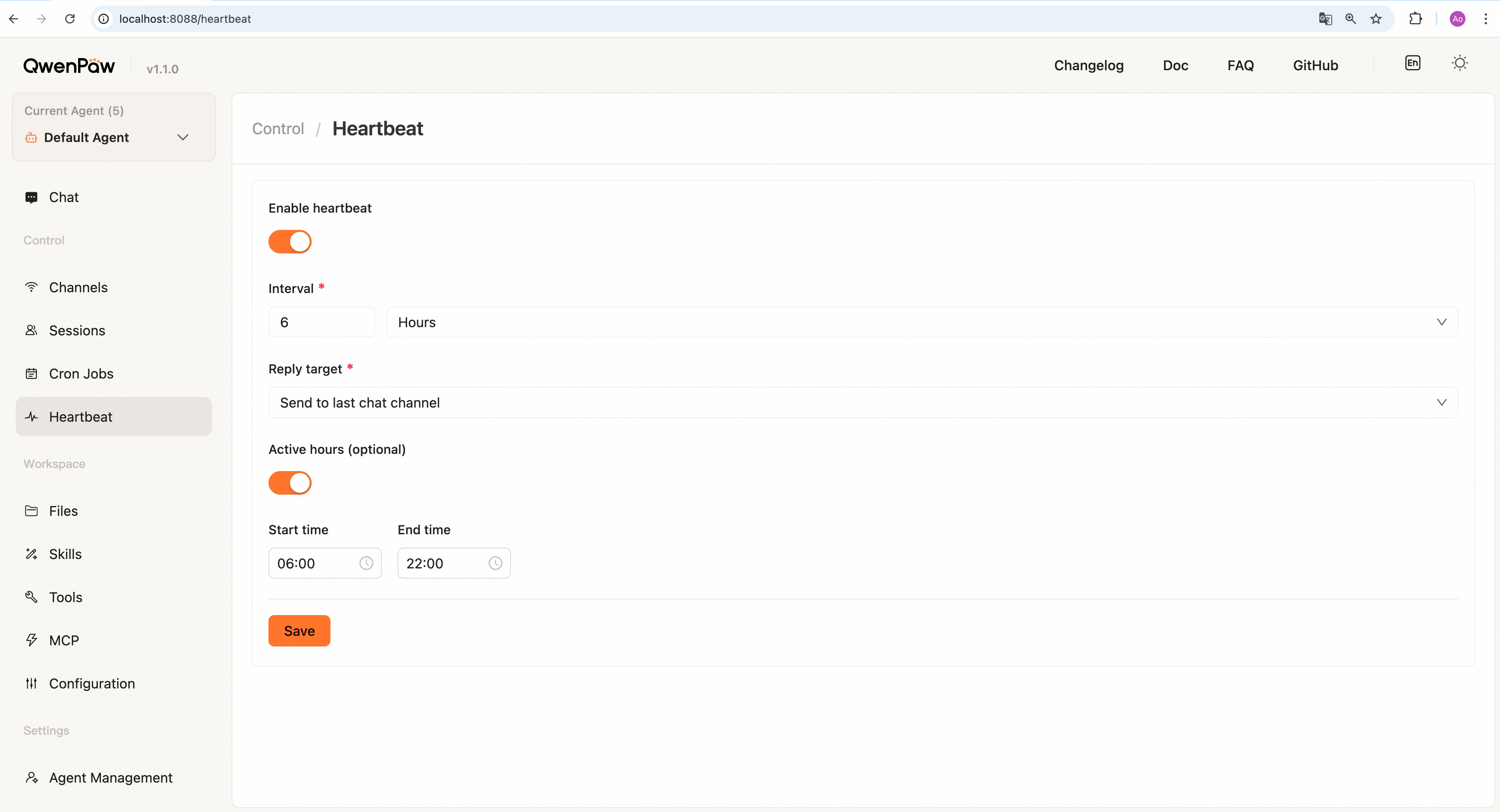
Prefer configuring on the Console **Heartbeat** page. To edit **`agent.json`**
|
|||
|
|
instead, use the following.
|
|||
|
|
|
|||
|
|
**Interval, on/off, target, execution timeout, and active hours** are read from
|
|||
|
|
**`heartbeat`** in the current agent’s **`workspaces/<agent_id>/agent.json`**
|
|||
|
|
(same as what the Console saves). After migration from older layouts, legacy
|
|||
|
|
**`agents.defaults.heartbeat`** in root **`config.json`** may have been merged
|
|||
|
|
into the default agent’s **`agent.json`** — treat **`agent.json`** as the
|
|||
|
|
source of truth for new changes.
|
|||
|
|
|
|||
|
|
| Field | Meaning |
|
|||
|
|
| ------------------ | ------------------------------------------------------------------------------------------------------------------------------------------------------------------------------------------------------------------------------------------------------------------------- |
|
|||
|
|
| **enabled** | Heartbeat on/off. **Default false**; the schedule runs only when **true**. |
|
|||
|
|
| **every** | How often: an interval string (`"30m"`, `"1h"`, `"2h30m"`, `"90s"`) **or** a space-separated **five-field cron** (minute hour day month weekday — same shape as cron jobs, e.g. daily 09:00: `"0 9 * * *"`). Cron is interpreted in the **process scheduler’s timezone**. |
|
|||
|
|
| **target** | **main** — don’t send to a channel; **last** — send using **`last_dispatch`** for that agent; **inbox** — send to Inbox. |
|
|||
|
|
| **timeoutSeconds** | Maximum execution time for one heartbeat run, in seconds. **Default 300**, valid range **1–3600**. |
|
|||
|
|
| **activeHours** | Optional daily window: `{ "start": "08:00", "end": "22:00" }`. |
|
|||
|
|
|
|||
|
|
If **every** is omitted, the built-in default applies (currently about **6
|
|||
|
|
hours** — confirm in your installed version).
|
|||
|
|
|
|||
|
|
Example (heartbeat on, QwenPaw only, no channel, every 30m) — in that agent’s
|
|||
|
|
**`agent.json`**:
|
|||
|
|
|
|||
|
|
```json
|
|||
|
|
{
|
|||
|
|
"heartbeat": {
|
|||
|
|
"enabled": true,
|
|||
|
|
"every": "30m",
|
|||
|
|
"target": "main"
|
|||
|
|
}
|
|||
|
|
}
|
|||
|
|
```
|
|||
|
|
|
|||
|
|
Example (send to last conversation channel, every 1h, only 08:00–22:00):
|
|||
|
|
|
|||
|
|
```json
|
|||
|
|
{
|
|||
|
|
"heartbeat": {
|
|||
|
|
"enabled": true,
|
|||
|
|
"every": "1h",
|
|||
|
|
"target": "last",
|
|||
|
|
"timeoutSeconds": 300,
|
|||
|
|
"activeHours": { "start": "08:00", "end": "22:00" }
|
|||
|
|
}
|
|||
|
|
}
|
|||
|
|
```
|
|||
|
|
|
|||
|
|
After changes, save **config.json**; if the service is running, settings apply
|
|||
|
|
as implemented (some setups may need a restart — see what you actually run).
|
|||
|
|
|
|||
|
|
---
|
|||
|
|
|
|||
|
|
## Heartbeat vs cron jobs
|
|||
|
|
|
|||
|
|
| | Heartbeat | Cron jobs |
|
|||
|
|
| ------------ | ----------------------------- | ------------------------------- |
|
|||
|
|
| **Count** | One file (HEARTBEAT.md) | Many jobs |
|
|||
|
|
| **Schedule** | One global interval | Each job has its own schedule |
|
|||
|
|
| **Delivery** | Optional last channel or none | Each job sets channel and user |
|
|||
|
|
| **Best for** | One fixed checklist / digest | Many tasks, times, and contents |
|
|||
|
|
|
|||
|
|
> Want “good morning at 9” or “every 2h ask todos and send to DingTalk” style
|
|||
|
|
> multi-task automation? Use [Scheduled Tasks](./cron) (or
|
|||
|
|
> [CLI](./cli) `qwenpaw cron create`) instead of heartbeat.
|
|||
|
|
|
|||
|
|
---
|
|||
|
|
|
|||
|
|
## Related pages
|
|||
|
|
|
|||
|
|
- [Introduction](./intro) — What the project can do
|
|||
|
|
- [Console](./console) — Turn heartbeat on/off and change interval in the web UI
|
|||
|
|
- [Channels](./channels) — Connect channels first so target=last has somewhere to send
|
|||
|
|
- [Scheduled Tasks](./cron) — Manage multiple independent scheduled jobs
|
|||
|
|
- [CLI](./cli) — Heartbeat at init, cron jobs
|
|||
|
|
- [Config & working dir](./config) — config.json, agent.json, working directory
|