
11 KiB
title, date, tags, cover, excerpt, related
| title | date | tags | cover | excerpt | related | |||||||||||||||||||||||||||||||||||||||||||||
|---|---|---|---|---|---|---|---|---|---|---|---|---|---|---|---|---|---|---|---|---|---|---|---|---|---|---|---|---|---|---|---|---|---|---|---|---|---|---|---|---|---|---|---|---|---|---|---|---|---|---|
| Fun QwenPaw Plugin Picks #1: Meetings, Tasks, Lights & Images | 2026-07-23 |
|
https://img.alicdn.com/imgextra/i1/6000000004826/O1CN014843Da1lWMZIlKBgv_!!6000000004826-0-tbvideo.jpg | With the right plugins, QwenPaw can host multi-agent meetings, turn ideas into kanban tasks, light up a desk ring when tools run, and generate cover images—all in one workflow. |
|
Fun QwenPaw Plugin Picks #1: Meetings, Tasks, Lights & Images
If you still think of QwenPaw as “just a chatty AI assistant,” the Plugin Marketplace may change your mind.
Once plugins are installed, QwenPaw can gather multiple agents for a meeting, turn the discussion into kanban tasks, light up a desk ring while tools run, and generate article covers and promo images. It stops being only a chat window and becomes an agent workbench for collaboration, execution, sensing, and creation.
This is the first issue of Fun QwenPaw Plugin Picks. We chose four very different plugins that happen to form one complete workflow: TeamChat, Agent Kanban, AgentAura, and the OpenRouter Image Tool.
Compatibility note: As of July 23, 2026, the marketplace compatibility info for the versions below all includes QwenPaw 2.0. Plugins keep updating—always check the latest version shown on the detail page before installing.
| Plugin | Version checked | QwenPaw 2.0 | One-line highlight |
|---|---|---|---|
| TeamChat | 5.0.18 | Supported | Let an AI host organize multi-agent meetings |
| Agent Kanban | 0.1.0 | Native | Assign tasks to agents and watch them work live |
| AgentAura | 0.3.0 | Supported | Show agent status with a desktop pet or ring light |
| OpenRouter Image Tool | 2.0.0 | Native | Generate and edit images in chat with multiple models |
01 TeamChat: Invite Multiple Agents Into One Meeting Room
When people use multiple agents, the usual approach is to chat with them one by one: a research agent finds sources, a writing agent drafts the article, then a review agent checks the content. The problem is that these conversations stay siloed, and a human still has to shuttle information around.
TeamChat offers a more “in-the-room” style of collaboration: pick one agent as the host, then invite others into the session. After a human proposes the topic, the host breaks down the problem, coordinates turns, and keeps the discussion moving, while other agents contribute from different angles.
It is more than several chat panes on one page. The plugin also supports brainstorming, multi-tab parallel sessions, viewpoint switching and comparison, meeting history, file collection, PPT replay, and round-table animation. If a discussion runs long, you can switch to another tab and come back later for the full result.
For example, you can start a “QwenPaw plugin-picks article planning meeting”: a product agent chooses topics, a content agent designs the article structure, a technical agent verifies facts, and the host consolidates an actionable plan. What used to require copy-paste across chats becomes a real multi-agent meeting.
Best for: People who regularly use multiple agents for content planning, proposal discussion, research analysis, or team decision-making.
Tip: TeamChat is feature-rich. For the first try, focus on the main path—“choose a host → invite agents → start a discussion → review viewpoints.” Explore email, channels, music, and other extras later.
02 Agent Kanban: After the Discussion, Agents Queue Up to Work
The worst outcome of a discussion is not a lack of ideas—it is ideas stuck in chat history.
Agent Kanban turns QwenPaw agent collaboration into a draggable task board with five stages: To Plan, Waiting for Schedule, In Progress, In Review, and Done. You can create tasks, assign agents, start execution, and watch what agents are doing through live streaming output.
It also keeps important human-in-the-loop steps: when a tool call needs approval, you can confirm it during the task; after an agent finishes, the task does not quietly disappear—it moves to review for a human check. Besides status view, you can switch to Agent view and see what each agent owns.
If TeamChat answers “let’s think together,” Agent Kanban answers “who does the work next.” After a meeting decides to publish a product article, you can split research, plugin trials, image generation, and final review into four cards and assign them to different agents.
Best for: People who want to use QwenPaw for ongoing projects, content production, or multi-step tasks—not just one-off Q&A.
Tip: Agent Kanban is still early at 0.1.0, great for exploring and showcasing QwenPaw 2.0 app plugins. Keep human review and result backups for important work.
03 AgentAura: When AI Thinks, the Desk Light Knows
AgentAura is the most “physical” plugin in this issue. It syncs QwenPaw runtime status to a standalone desktop-pet app or an ESP32 ring-light board, so agent activity is no longer only a tiny on-screen hint.
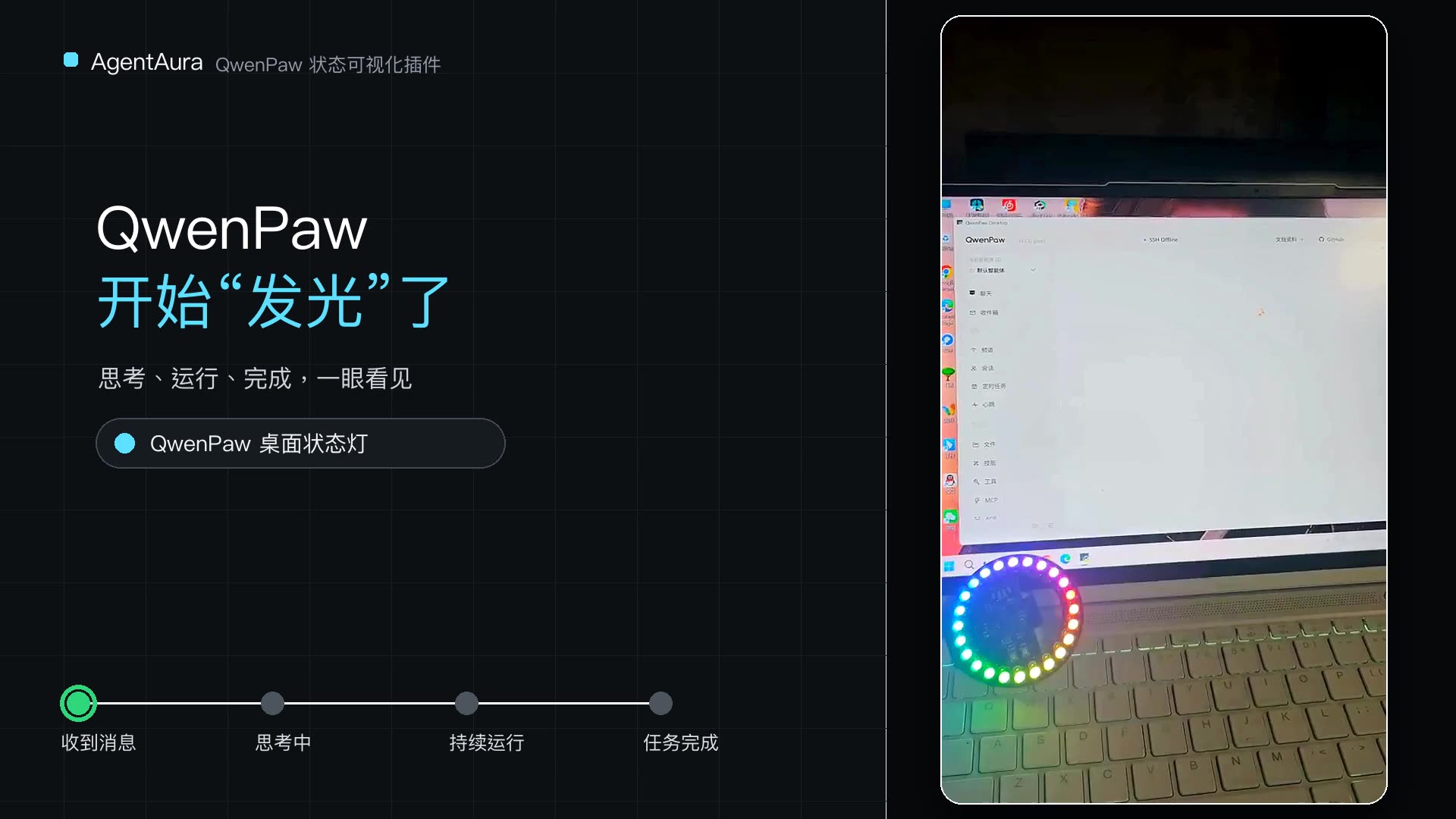
When QwenPaw starts, receives a message, thinks, calls tools, waits for approval, finishes, or errors, AgentAura maps those events to different pet states or light effects. For example: rainbow on startup, yellow motion while busy/thinking, blue breathing when done, and red blinking on error.
It looks like a fun desk toy, but it solves a real problem: during long-running tasks, you do not have to stare at the chat window. A glance at the light tells you whether it is running, waiting for confirmation, or already finished.
22-second demo: How QwenPaw status lights up the ring
Video note: Recorded on QwenPaw v1.1.12.post1 to show AgentAura’s cross-version status and light sync. AgentAura v0.3.0 checked in this article is marked compatible with both QwenPaw 1.x and 2.x in the marketplace.
In the video, after QwenPaw receives a task and enters thinking/tool execution, the ring turns yellow; when the task completes, it switches to blue—turning the whole run into visible status feedback.
AgentAura supports HTTP, UDP, and USB serial. Without hardware, you can start with the desktop-pet app; if you like DIY, connect an ESP32 and WS2812B ring board and build a real desk agent status light.
Best for: Fans of desktop pets, smart hardware, and desk setups—or anyone who often lets agents run long background tasks.
Tip: This plugin needs the most setup: install the pet app or prepare compatible hardware. For public or LAN connections, carefully configure access boundaries and authentication.
04 OpenRouter Image Tool: Let QwenPaw Finish the Artwork
You have the discussion and the task board. Next you need a usable cover image.
The OpenRouter Image Tool lets QwenPaw call the OpenRouter Image API to generate and edit images in chat. It supports Google Gemini and OpenAI GPT Image models, can switch models by task, and handles resolution, aspect ratio, quality, transparent background, and reference images.
In practice, you do not need to fill a long config form every time. Just tell QwenPaw: “Generate a 16:9 article cover about four agents collaborating around a task board, and leave title space on the right.” The agent organizes parameters, calls the model, and saves the result. For revisions, provide a reference image and describe what to change.
For blogging, social content, or product demos, the real value is not “yet another image entry point,” but that image generation plugs into the agent workflow: an Agent Kanban “generate cover” card no longer requires switching to another website.
Best for: Creators who frequently make article covers, product visuals, concept art, or reference-based edits.
Tip: Prepare an OpenRouter API Key first; models may bill differently, and names/parameters can change. Do a low-cost small-image test before production use.
Connecting the Four Plugins Is What Makes This Issue Fun
These four plugins are not isolated feature islands. Combined, they form a fairly complete agent workflow:
- Start a topic meeting in TeamChat, where multiple agents discuss goals, audience, and structure.
- Break confirmed work into Agent Kanban cards for research, writing, design, and review agents.
- During execution, use AgentAura pets or lights to see whether agents are thinking, waiting for approval, or done.
- Finish covers and visuals with the OpenRouter Image Tool and deliver the result.
That is what makes the QwenPaw plugin ecosystem worth exploring: one plugin solves one concrete problem; several plugins together can change the whole way of working. Chat is only the entrance—the interesting part is when agents organize collaboration, drive tasks, and connect with both digital and physical environments.
If you are just getting started, begin with TeamChat or Agent Kanban. If you care most about visual delight, AgentAura’s light sync is the biggest surprise. If you already need lots of images, the OpenRouter Image Tool shows practical value fastest.
In the next issue, we will keep hunting Plugin Marketplace ideas that make QwenPaw more personal and more fun.
Install & Safety Notes
- All four plugins are available from the AgentScope Platform Plugin Marketplace—open each detail page to review and install.
- As of the check date in this article, all four detail pages show a passed platform security scan. A scan is not absolute safety: plugins run inside the QwenPaw process, so still verify source and permissions.
- Before installing, re-check QwenPaw compatibility, dependencies, and the latest version notes on the detail page.
- AgentAura needs a desktop-pet app or compatible hardware; the OpenRouter Image Tool needs a separate API Key and may incur model usage costs.