
236 lines
7.7 KiB
Markdown
236 lines
7.7 KiB
Markdown
# Scheduled Tasks
|
|
|
|
In QwenPaw, scheduled tasks (cron jobs) let the system run actions
|
|
automatically at specific times, for example:
|
|
|
|
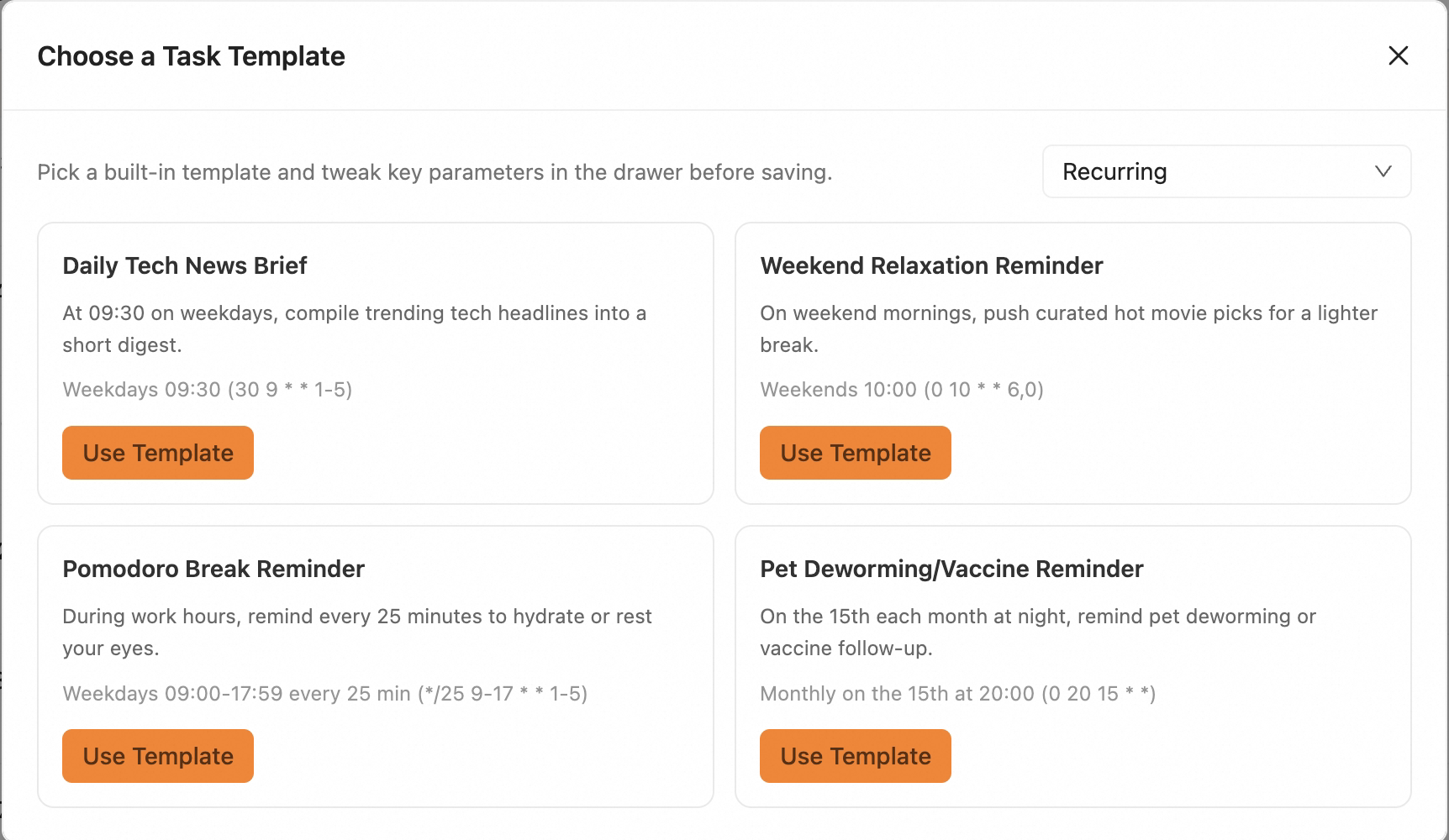
- Remind you to stand up every 25 minutes during work hours.
|
|
- Generate and deliver a daily tech brief at 09:30 on weekdays.
|
|
|
|
Unlike [Heartbeat](./heartbeat), scheduled tasks support **multiple jobs in
|
|
parallel**. Each job can have its own timing, content, and delivery target.
|
|
|
|
---
|
|
|
|
## Recurring vs Calendar Tasks
|
|
|
|
In practice, scheduled tasks are usually configured in two styles:
|
|
|
|
- **Recurring tasks**: focus on "how often" (every 15 minutes, every 2 hours,
|
|
every day at 09:00).
|
|
- **Calendar tasks**: focus on exact calendar points (for example, 2026-01-01
|
|
at 09:00).
|
|
|
|
Both are powered by a unified scheduler under the hood: recurring tasks use
|
|
Cron expressions, while calendar tasks use a start time plus optional repeat
|
|
rules. Choose the style that best matches your workflow.
|
|
|
|
Common recurring task templates:
|
|
|
|
|
|
|
|
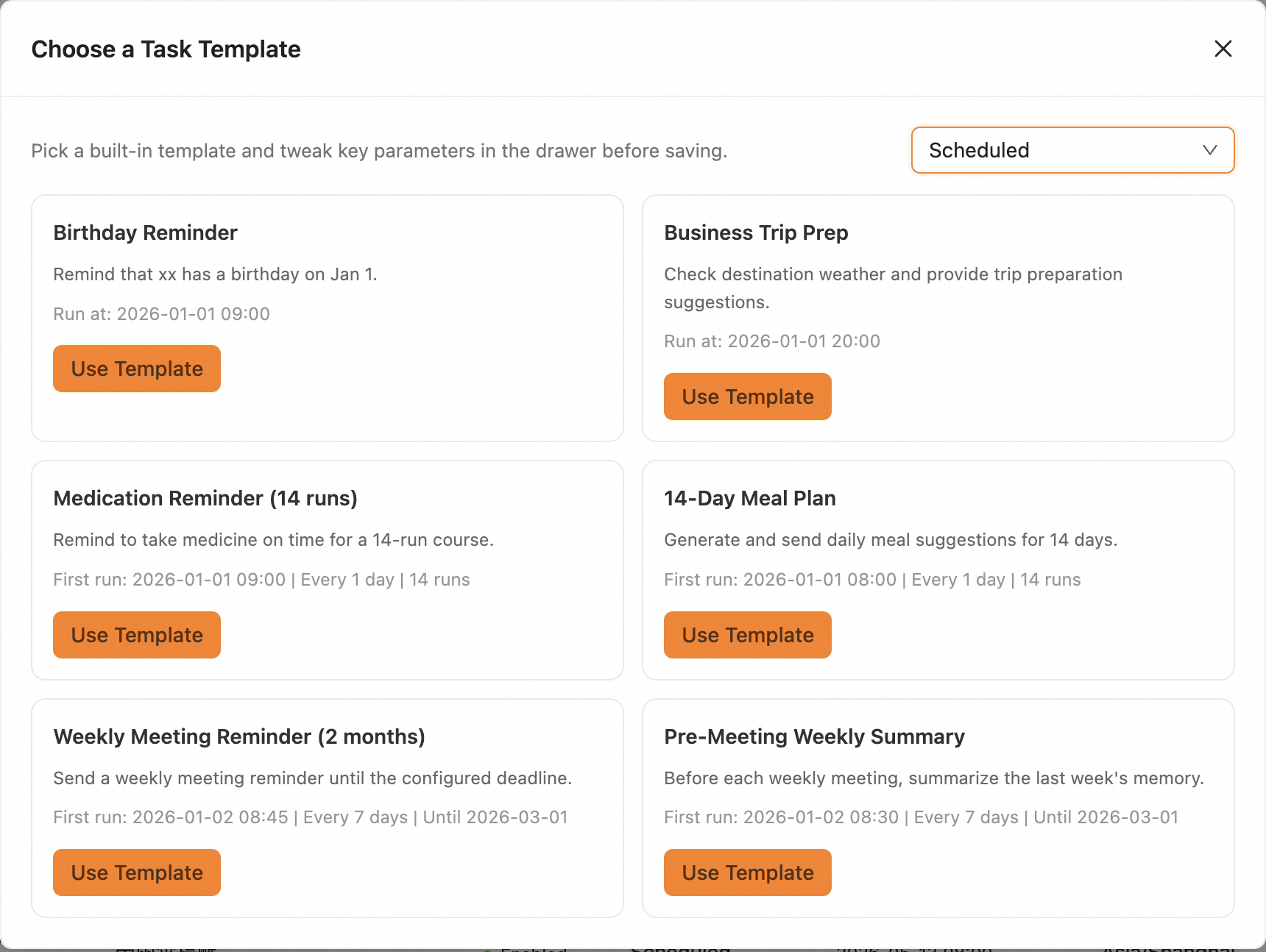
Common calendar task templates:
|
|
|
|
|
|
|
|
Calendar tasks support **one-time runs / recurring runs with end date /
|
|
recurring runs with run-count limits**.
|
|
|
|
## Manage Scheduled Tasks
|
|
|
|
**Create a task**
|
|
|
|
> If creation fails, check [FAQ](https://qwenpaw.agentscope.io/docs/faq) under
|
|
> "Scheduled task troubleshooting".
|
|
|
|
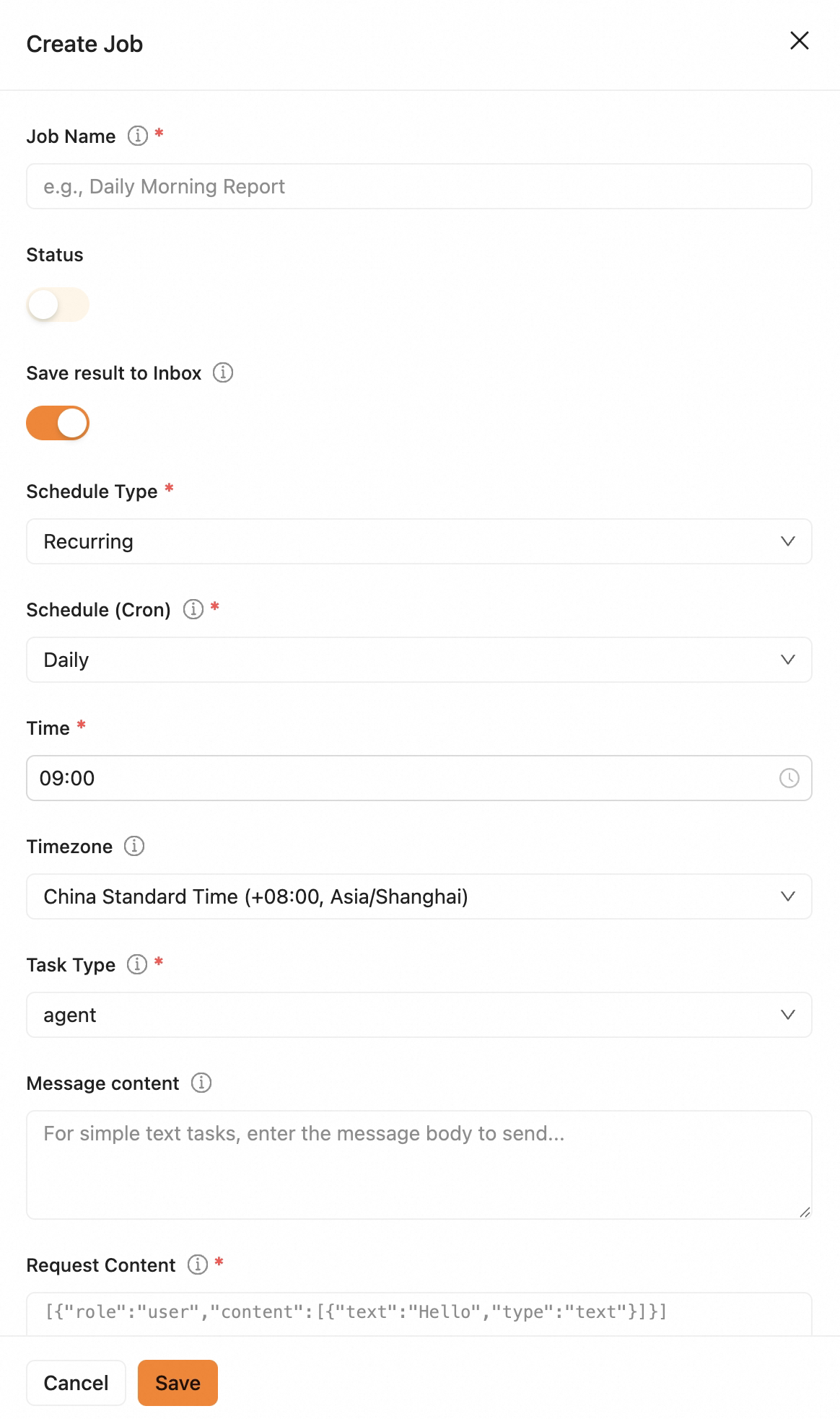
1. Click **Create Task**.
|
|
|
|
|
|
|
|
2. Fill in fields:
|
|
- **Basic info**: set a task name and enable the task.
|
|
- **Save result to Inbox**: when enabled, execution results are sent to Inbox
|
|
with trace details.
|
|
- **Schedule**:
|
|
- For **Recurring task**, pick a schedule directly, or enter a five-field
|
|
Cron expression (for example, `0 9 * * *` = daily 09:00). Timezone
|
|
defaults to the current agent user timezone and can be changed.
|
|
- For **Calendar task**, pick time from the calendar UI.
|
|
- With **Repeat** off, it behaves as a one-time task.
|
|
- With **Repeat** on, choose repetition frequency and an end condition:
|
|
- **No end**: keeps running at the chosen schedule.
|
|
- **End on date**: stops after the selected end date.
|
|
- **End after N runs**: stops after reaching the run count (manual
|
|
runs are not counted).
|
|
- **Task type and content**:
|
|
- **text**: send fixed text content.
|
|
- **agent**: send `content.text` to QwenPaw and deliver its response.
|
|
- **Delivery**: choose target channel (Console, DingTalk, etc.), user ID,
|
|
and session ID. You can pick from existing sessions or enter custom
|
|
values.
|
|
- **Shared session**: if enabled, share session context with the target user.
|
|
If disabled, runs happen in an isolated session.
|
|
- **Advanced options**: tune max concurrency, timeout, and grace period.
|
|
3. Click **Save**.
|
|
|
|
**View execution records:**
|
|
In list view, each task row has **Execution Records** on the right. Open it to
|
|
see when and how each run was triggered (scheduled/manual) and whether it
|
|
succeeded.
|
|
|
|
**Enable / disable task:**
|
|
Use the inline switch in the task row.
|
|
|
|
**Edit task:**
|
|
Disable the task first, click **Edit**, update fields, then **Save**.
|
|
|
|
**Run now:**
|
|
Click **Execute Now** and confirm to run immediately.
|
|
|
|
**Delete task:**
|
|
Disable the task first, click **Delete**, then confirm.
|
|
|
|
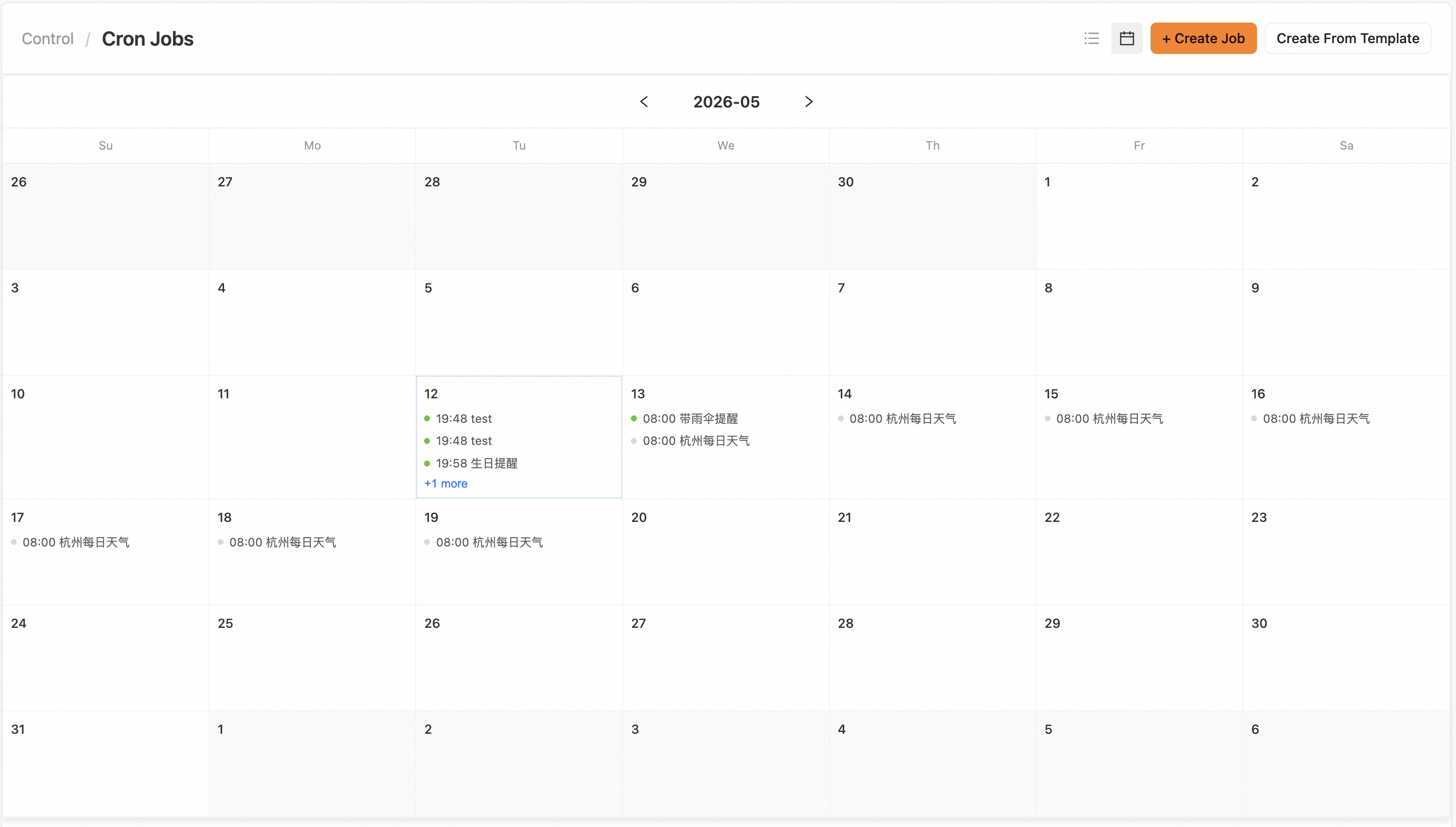
**Calendar view:**
|
|
The new **Calendar View** displays all calendar tasks by date so you can quickly
|
|
review upcoming plans. Click a task to open its edit page.
|
|
|
|
|
|
|
|
---
|
|
|
|
## More Creation Methods
|
|
|
|
### Method 1: Create by chat
|
|
|
|
You can also tell QwenPaw directly in your target channel:
|
|
|
|
> Help me create a scheduled task that reminds me to drink water every 5
|
|
> minutes.
|
|
|
|
After creation, the task appears in the Console task list.
|
|
|
|
### Method 2: Create from templates
|
|
|
|
The new **Create from Template** flow lets you choose **Recurring Task** or
|
|
**Calendar Task** templates first, then adjust name, schedule, and
|
|
message/request content. Default delivery goes to the Console `cron_job`
|
|
session, with `default` as user ID.
|
|
|
|

|
|
|
|
### Method 3: CLI
|
|
|
|
See [CLI `qwenpaw cron` section](./cli#qwenpaw-cron). Common commands:
|
|
|
|
```bash
|
|
qwenpaw cron list
|
|
qwenpaw cron create ...
|
|
qwenpaw cron state <job_id>
|
|
qwenpaw cron run <job_id>
|
|
qwenpaw cron pause <job_id>
|
|
qwenpaw cron resume <job_id>
|
|
qwenpaw cron delete <job_id>
|
|
```
|
|
|
|
Example (send fixed text every day at 09:00):
|
|
|
|
```bash
|
|
qwenpaw cron create \
|
|
--agent-id default \
|
|
--type text \
|
|
--schedule-type cron \
|
|
--name "Daily Greeting" \
|
|
--cron "0 9 * * *" \
|
|
--channel dingtalk \
|
|
--target-user "your_user_id" \
|
|
--target-session "your_session_id" \
|
|
--text "Good morning. Remember to review today's todos."
|
|
```
|
|
|
|
Example (ask QwenPaw every 2 hours and deliver the response):
|
|
|
|
```bash
|
|
qwenpaw cron create \
|
|
--agent-id default \
|
|
--type agent \
|
|
--schedule-type cron \
|
|
--name "Todo Patrol" \
|
|
--cron "0 */2 * * *" \
|
|
--channel dingtalk \
|
|
--target-user "your_user_id" \
|
|
--target-session "your_session_id" \
|
|
--text "Please review my todos and list the top three priorities."
|
|
```
|
|
|
|
Add `--silent` to an `agent` task when it should run in the background without
|
|
sending its response to the channel. The task still keeps its session and
|
|
trace, and `--save-result-to-inbox` remains independent.
|
|
|
|
Example (calendar task, one-time run only):
|
|
|
|
```bash
|
|
qwenpaw cron create \
|
|
--agent-id default \
|
|
--type text \
|
|
--schedule-type scheduled \
|
|
--name "Tomorrow Standup Reminder" \
|
|
--run-at "2026-05-13T09:00:00+08:00" \
|
|
--channel dingtalk \
|
|
--target-user "your_user_id" \
|
|
--target-session "your_session_id" \
|
|
--text "Standup starts at 09:00." \
|
|
--save-result-to-inbox
|
|
```
|
|
|
|
Example (calendar task, every day for 14 runs):
|
|
|
|
```bash
|
|
qwenpaw cron create \
|
|
--agent-id default \
|
|
--type text \
|
|
--schedule-type scheduled \
|
|
--name "Two-week Standup Reminder" \
|
|
--run-at "2026-05-13T09:00:00+08:00" \
|
|
--repeat-every-days 1 \
|
|
--repeat-end-type count \
|
|
--repeat-count 14 \
|
|
--channel dingtalk \
|
|
--target-user "your_user_id" \
|
|
--target-session "your_session_id" \
|
|
--text "Standup starts at 09:00." \
|
|
--save-result-to-inbox
|
|
```
|
|
|
|
Parameter notes:
|
|
|
|
- `--schedule-type cron`: requires `--cron`
|
|
- `--schedule-type scheduled`: requires `--run-at`
|
|
- For repeating `scheduled` tasks, pass `--repeat-every-days` and an end condition (`count` / `until` / `never`)
|
|
- `--silent` is available for `agent` tasks only and suppresses channel delivery, not execution
|
|
- To control Inbox delivery, explicitly pass `--save-result-to-inbox` or `--no-save-result-to-inbox`
|
|
|
|
---
|
|
|
|
## Cron Expression Quick Reference
|
|
|
|
QwenPaw uses five-field cron: **minute hour day month weekday** (no seconds).
|
|
|
|
| Expression | Meaning |
|
|
| -------------- | ------------------------------- |
|
|
| `0 9 * * *` | Every day at 09:00 |
|
|
| `0 */2 * * *` | Every 2 hours at the hour |
|
|
| `30 8 * * 1-5` | Weekdays at 08:30 |
|
|
| `0 10 * * 1` | Every Monday at 10:00 |
|
|
| `0 9 1 * *` | First day of every month, 09:00 |
|
|
| `0 18 31 12 *` | Dec 31 every year at 18:00 |
|
|
| `*/15 * * * *` | Every 15 minutes |
|
|
|
|
---
|
|
|
|
## Related Pages
|
|
|
|
- [Console](./console) — Manage scheduled tasks in the web UI
|
|
- [CLI `qwenpaw cron` section](./cli#qwenpaw-cron) — command reference
|
|
- [Heartbeat](./heartbeat) — Fixed periodic self-check / digest
|
|
- [FAQ](./faq#scheduled-task-troubleshooting) — Common troubleshooting
|
|
- [Config & working dir](./config) — `jobs.json` and workspace details
|