
522 lines
32 KiB
Markdown
522 lines
32 KiB
Markdown
# Long-term Memory
|
||
|
||
**Long-term Memory** gives QwenPaw persistent memory across conversations. In the default backend, QwenPaw embeds the
|
||
ReMe application in-process and runs ReMe jobs to save conversation facts, build daily notes, extract digest memories,
|
||
watch resource files, and search the memory vault.
|
||
|
||
> The long-term memory mechanism is inspired by [OpenClaw](https://github.com/openclaw/openclaw) and implemented via **ReMeLight** from [ReMe](https://github.com/agentscope-ai/ReMe) — a file-based memory backend where working and long-term memory nodes are plain Markdown files that can be read, edited, and migrated directly.
|
||
|
||
ReMe's core goal is to grow a **self-evolving personal knowledge base** on the principle of _Memory as File, File as Memory_. Every working or long-term memory node is a plain Markdown file — readable, editable, traceable, portable, and maintained collaboratively by you and the agent — and at the same time indexable and linkable. Raw sources and derived system state use formats suited to their roles. The workspace organizes memory into four layers:
|
||
|
||
| Layer | QwenPaw directory | Role |
|
||
| ---------------- | --------------------------- | ------------------------------------------------------------- |
|
||
| Raw input | `mem_session/`, `resource/` | Original conversations and external material kept as evidence |
|
||
| Working memory | `memory/` | Daily notes: facts, decisions, and resource readings |
|
||
| Long-term memory | `digest/` | Reusable knowledge nodes (`personal` / `procedure` / `wiki`) |
|
||
| System state | `mem_metadata/` | Indexes, wikilink graph, catalogs — not hand-edited |
|
||
|
||
Memory evolves through a **capture → index → consolidate → recall** loop: Auto-Memory / Auto-Resource capture daily notes, indexing keeps them searchable, Auto-Dream consolidates them into linked digest nodes, and search / proactive recall them. For the full narrative — including how Auto-Dream corroborates, refines, and corrects digest nodes and weaves the wikilink graph — see [Memory-Evolving & Proactive Interaction](./memory-evolving-and-proactive). The sections below cover the technical implementation and configuration.
|
||
|
||
---
|
||
|
||
## Architecture Overview
|
||
|
||
```mermaid
|
||
graph TB
|
||
User[User / Agent] --> Middleware[MemoryMiddleware]
|
||
Middleware --> Manager[ReMeLightMemoryManager]
|
||
Manager --> ReMe[Embedded ReMe Application]
|
||
ReMe --> Jobs[ReMe Jobs]
|
||
Jobs --> AutoMemory[auto_memory]
|
||
Jobs --> AutoDream[auto_dream]
|
||
Jobs --> Search[search]
|
||
Jobs --> Resource[auto_resource]
|
||
Jobs --> Reindex[reindex / index_update_loop]
|
||
AutoMemory --> Daily[memory/YYYY-MM-DD/*.md]
|
||
AutoMemory --> Session[mem_session/dialog/*.jsonl]
|
||
AutoDream --> Digest[digest/*.md and interests.yaml]
|
||
Resource --> ResourceDir[resource/*]
|
||
Search --> Store[mem_metadata file store + BM25 + optional embeddings]
|
||
```
|
||
|
||
Long-term memory management includes the following capabilities:
|
||
|
||
| Capability | Description |
|
||
| ---------------------- | ---------------------------------------------------------------------------------------------------------------- |
|
||
| **Embedded ReMe app** | QwenPaw starts ReMe in-process and injects the active QwenPaw model into ReMe's default LLM component |
|
||
| **Auto-Memory** | After a configurable number of user turns, ReMe extracts useful conversation facts into daily Markdown notes |
|
||
| **Context compaction** | Before context compression, pending turns can be flushed into the same `auto_memory` pipeline |
|
||
| **Auto-Dream** | A cron job extracts higher-level digest units and proactive-interest topics from recent daily notes |
|
||
| **Hybrid Search** | `memory_search` calls ReMe's `search` job, using BM25 plus optional vector search and reciprocal-rank fusion |
|
||
| **Resource Memory** | Files under `resource/` are cataloged and can be interpreted into source-linked daily notes |
|
||
| **Inbox Results** | `auto_memory`, `auto_dream`, and `auto_resource` results are pushed to QwenPaw's inbox when they produce changes |
|
||
|
||
---
|
||
|
||
## Memory File Structure
|
||
|
||
Memories are stored as plain files under the agent workspace. ReMe's Markdown files are the readable source of memory,
|
||
while `mem_metadata/` stores search indexes, catalogs, graphs, and embedding caches.
|
||
|
||
```
|
||
{workspace}/
|
||
├── memory/ ← Daily memory notes
|
||
│ └── 2026-06-29/
|
||
│ ├── project-plan.md ← One note written/updated by auto_memory
|
||
│ └── index.md ← Day index generated from the day's notes
|
||
│
|
||
├── mem_session/
|
||
│ └── dialog/
|
||
│ └── <session_id>.jsonl ← Sanitized conversation history used as note source
|
||
│
|
||
├── digest/ ← Auto-Dream digest memory and interest topics
|
||
├── resource/ ← External assets watched by auto_resource
|
||
└── mem_metadata/ ← ReMe persistent indexes, graph, catalogs, and caches
|
||
├── file_store/
|
||
│ └── file_chunks_default_v1.jsonl.zst
|
||
├── file_graph/
|
||
│ └── default.jsonl.zst
|
||
├── file_catalog/
|
||
│ ├── default.jsonl.zst
|
||
│ ├── resource.jsonl.zst
|
||
│ ├── digest.jsonl.zst
|
||
│ └── dream.jsonl.zst
|
||
├── embedding_store/
|
||
│ └── default_v1.npz
|
||
└── keyword_index/
|
||
└── bm25_default_<tokenizer>_<fingerprint>_v1.pkl
|
||
```
|
||
|
||
Under the default workspace layout, the full path is
|
||
`~/.qwenpaw/workspaces/{agent_id}/mem_metadata/`.
|
||
`file_store/file_chunks_default_v1.jsonl.zst` is the authoritative chunk store. Vectors are encoded as float16 in
|
||
the `_embedding_f16_b64` field of its compressed JSONL records, rather than in a separate vector-database directory.
|
||
`embedding_store/default_v1.npz` is the local embedding cache used when `enable_cache` is enabled; it is not the
|
||
authoritative index and may not appear until the cache is persisted. The tokenizer name and fingerprint in the actual
|
||
BM25 filename vary with configuration.
|
||
|
||
### memory/YYYY-MM-DD/\*.md (Daily Notes)
|
||
|
||
Daily notes are the default Auto-Memory output. ReMe writes one or more notes per day, keyed by the source conversation
|
||
session. Each note includes frontmatter such as `session_id` and `source_conversation`, so later updates can find and
|
||
modify the existing note instead of creating duplicates.
|
||
|
||
- **Location**: `{working_dir}/memory/YYYY-MM-DD/*.md`
|
||
- **Purpose**: Stores durable conversation facts, decisions, preferences, and work notes
|
||
- **Updates**: ReMe `auto_memory` creates or edits notes using ReMe file jobs such as `daily_write`, `read`, `edit`,
|
||
`frontmatter_update`, and `write`
|
||
- **Index**: After each successful write, ReMe refreshes the day's `index.md`
|
||
|
||
### mem_session/dialog/\*.jsonl (Conversation Source)
|
||
|
||
Before extracting memory, ReMe saves the relevant messages into a session log. Tool-result blocks and base64 data blocks
|
||
are stripped so recalled memory or large media cannot be mistaken for user-provided facts in future extraction runs.
|
||
|
||
- **Location**: `{working_dir}/mem_session/dialog/<session_id>.jsonl` by default
|
||
- **Purpose**: Source traceability for daily notes
|
||
- **Linking**: Daily-note frontmatter links back to the source conversation with `[[mem_session/dialog/<session_id>.jsonl]]`
|
||
|
||
### digest/ (Dream Memory)
|
||
|
||
`digest/` is the long-term knowledge layer — the part of the knowledge base that actually evolves. Auto-Dream reads recent
|
||
daily notes, extracts reusable memory units, integrates each into a digest node, updates the dream catalog, and writes
|
||
user-interest topics for proactive use.
|
||
|
||
- **Location**: `{working_dir}/digest/`
|
||
- **Buckets**: `personal/` (user, team, and project identity, preferences, and conventions), `procedure/` (how-to
|
||
workflows, runbooks, and reusable methods), and `wiki/` (definitions, principles, observations, and decision precedents)
|
||
- **Evolution, not append**: each unit is integrated with a `CREATE`, `CORROBORATE`, `REFINE`, or `CORRECT` action, so
|
||
repeated facts are merged and strengthened rather than duplicated
|
||
- **Wikilink graph**: nodes carry source edges (`derived_from:: [[memory/<date>/<note>.md]]`) and relationship edges
|
||
(`relates_to:: [[digest/...]]`) so digest memory stays traceable and connected; `memory_search` expands along these links
|
||
- **Updates**: ReMe `auto_dream`, usually triggered by `dream_cron`
|
||
|
||
### resource/ (Resource Memory)
|
||
|
||
Files placed under `resource/` are watched and cataloged. When supported files change, ReMe can interpret them into
|
||
source-linked daily notes via `auto_resource`.
|
||
|
||
- **Location**: `{working_dir}/resource/`
|
||
- **Supported default suffixes**: `md`, `txt`, `json`, `jsonl`, `csv`, `yaml`, `html`
|
||
- **Date assignment**: Files directly under `resource/` are assigned to the current date. Files under
|
||
`resource/YYYY-MM-DD/` use that date and may be nested in additional subdirectories.
|
||
- **Output**: Creates or updates `memory/YYYY-MM-DD/<note>.md` and retains a `source_resource` link in its frontmatter
|
||
- **Inbox behavior**: Resource processing results are pushed to the inbox only when memory changed
|
||
|
||
```text
|
||
resource/report.txt # Assigned to the current date
|
||
resource/2026-07-14/report.txt # Assigned to 2026-07-14
|
||
resource/2026-07-14/project/data.json # Subdirectories are allowed below the date
|
||
```
|
||
|
||
> Auto Resource currently reads resources as UTF-8 text. Binary files such as PDF, Word, Excel, and images are not in
|
||
> the watched-suffix list and are not parsed automatically; convert them to one of the supported text formats first.
|
||
> The `yml` suffix is also not in the default allowlist; use `yaml`.
|
||
|
||
> For a complete walkthrough of Auto-Memory, Auto-Dream, Auto-Memory-Search, and Proactive, see [Memory-Evolving & Proactive Interaction](./memory-evolving-and-proactive). The sections below cover technical implementation details and configuration only.
|
||
|
||
---
|
||
|
||
## Searching Memory
|
||
|
||
The Agent has two ways to retrieve past memories:
|
||
|
||
| Method | Tool | Use Case | Example |
|
||
| ------------- | --------------- | ----------------------------------------------------------- | ---------------------------------------------- |
|
||
| Hybrid search | `memory_search` | Unsure which file contains the info; fuzzy recall by intent | "Previous discussion about deployment process" |
|
||
| Direct read | File tools | Known specific date or file path; precise lookup | Read `memory/2026-06-29/project-plan.md` |
|
||
|
||
### Hybrid Search Explained
|
||
|
||
`memory_search` calls ReMe's `search` job. Search always tries keyword retrieval through BM25 and also runs vector
|
||
retrieval when an embedding model is configured. When both paths return results, ReMe fuses the ranked lists with
|
||
**Reciprocal Rank Fusion (RRF)**.
|
||
|
||
#### Vector Semantic Search
|
||
|
||
Maps text into a high-dimensional vector space and measures semantic distance via cosine similarity, capturing content
|
||
with similar meaning but different wording:
|
||
|
||
| Query | Recalled Memory | Why It Matches |
|
||
| --------------------------------------- | --------------------------------------------------------- | --------------------------------------------------------------- |
|
||
| "Database choice for the project" | "Finally decided to replace MySQL with PostgreSQL" | Semantically related: both discuss database technology choices |
|
||
| "How to reduce unnecessary rebuilds" | "Configured incremental compilation to avoid full builds" | Semantic equivalence: reduce rebuilds ≈ incremental compilation |
|
||
| "Performance issue discussed last time" | "Optimized P99 latency from 800ms to 200ms" | Semantic association: performance issue ≈ latency optimization |
|
||
|
||
However, vector search is weaker on **precise, high-signal tokens**, as embedding models tend to capture overall
|
||
semantics rather than exact matches of individual tokens.
|
||
|
||
#### BM25 Keyword Search
|
||
|
||
Based on term frequency statistics for substring matching, excellent for precise token hits, but weaker on semantic
|
||
understanding (synonyms, paraphrasing).
|
||
|
||
| Query | BM25 Hits | BM25 Misses |
|
||
| -------------------------- | ---------------------------------------------- | ----------------------------------------------------- |
|
||
| `handleWebSocketReconnect` | Memory fragments containing that function name | "WebSocket disconnection reconnection handling logic" |
|
||
| `ECONNREFUSED` | Log entries containing that error code | "Database connection refused" |
|
||
|
||
ReMe maintains a local BM25 index over indexed files. This gives reliable hits for exact identifiers, error codes,
|
||
filenames, and uncommon words even when embeddings are unavailable.
|
||
|
||
#### Hybrid Search Fusion
|
||
|
||
When both vector and BM25 return candidates, ReMe uses weighted RRF. The default vector weight is `0.7`; the remaining
|
||
`0.3` goes to keyword search.
|
||
|
||
1. **Expand candidate pool**: Multiply the desired result count by `candidate_multiplier` (default 3×, capped at 200);
|
||
each path retrieves more candidates independently
|
||
2. **Independent ranking**: Vector and BM25 each return ranked result lists
|
||
3. **RRF merging**: Deduplicate by chunk id and add rank-based contributions:
|
||
- Vector contribution: `0.7 / (60 + vector_rank)`
|
||
- Keyword contribution: `0.3 / (60 + keyword_rank)`
|
||
- Chunks found by both paths receive both contributions
|
||
4. **Sort and truncate**: Sort by `final_score` descending, return top-N results
|
||
5. **Link expansion**: Search can include nearby linked files to provide additional context
|
||
|
||
**Example**: Query `"handleWebSocketReconnect disconnection reconnect"`
|
||
|
||
| Memory Fragment | Vector Rank | BM25 Rank | Why It Ranks Well |
|
||
| ----------------------------------------------------------------------------- | ----------- | --------- | --------------------------------------------------- |
|
||
| "handleWebSocketReconnect function handles WebSocket disconnection reconnect" | 2 | 1 | Strong semantic match plus exact keyword hit |
|
||
| "Logic for automatic retry after network disconnection" | 1 | - | Strong semantic match even without exact identifier |
|
||
| "Fixed null pointer exception in handleWebSocketReconnect" | - | 2 | Exact identifier hit keeps it in the candidate set |
|
||
|
||
```mermaid
|
||
graph LR
|
||
Query[Search Query] --> Vector[Vector Semantic Search x0.7]
|
||
Query --> BM25[BM25 Keyword Search x0.3]
|
||
Vector --> Merge[Deduplicate by chunk + Weighted RRF]
|
||
BM25 --> Merge
|
||
Merge --> Sort[Sort by fused score descending]
|
||
Sort --> Results[Return top-N results]
|
||
```
|
||
|
||
> **Summary**: Using any single search method alone has blind spots. Hybrid search lets the two signals complement each
|
||
> other, delivering reliable recall whether you're asking in natural language or searching for exact terms.
|
||
|
||
### Verifying That Vector Search Is Working
|
||
|
||
Ask the Agent to call `memory_search` and return its tool result verbatim. Replace `xxx` with the query to test:
|
||
|
||
```text
|
||
Please call the memory_search tool and search for "xxx". Return the raw tool result exactly as-is,
|
||
including every separator line and all score, vector, and keyword fields. Do not summarize or rewrite the result.
|
||
```
|
||
|
||
To test semantic recall rather than keyword matching, first save a memory such as "My preferred commute is a
|
||
lightweight bicycle.", then search for "How does the user usually travel to work?". The sentences have no obvious
|
||
keyword overlap but are semantically related, making a vector hit easier to identify.
|
||
|
||
The scores below are illustrative:
|
||
|
||
**Only the vector branch has a hit:**
|
||
|
||
```text
|
||
========== memory/2026-07-23/commute.md:1-6 [score=0.8237] ==========
|
||
My preferred commute is a lightweight bicycle.
|
||
```
|
||
|
||
Here, `score` is the raw cosine-similarity score.
|
||
|
||
**Only the BM25 branch has a hit:**
|
||
|
||
```text
|
||
========== memory/2026-07-23/commute.md:1-6 [score=3.1842] ==========
|
||
My preferred commute is a lightweight bicycle.
|
||
```
|
||
|
||
Here, `score` is the raw BM25 score. When the output contains only `[score=...]`, the number alone does not strictly
|
||
identify which branch produced it; consider whether the query contains an exact keyword match or inspect the search
|
||
log described below.
|
||
|
||
**Hybrid retrieval, with candidates from both branches:**
|
||
|
||
```text
|
||
========== memory/2026-07-23/commute.md:1-6 [score=0.0164 vector=0.8237 keyword=3.1842] ==========
|
||
My preferred commute is a lightweight bicycle.
|
||
|
||
========== memory/2026-07-20/purchase.md:3-7 [score=0.0113 vector=0.7915 keyword=-] ==========
|
||
The user bought a lightweight two-wheeled vehicle.
|
||
|
||
========== memory/2026-07-18/maintenance.md:2-5 [score=0.0048 vector=- keyword=2.5176] ==========
|
||
Bicycle maintenance is scheduled for the weekend.
|
||
```
|
||
|
||
- `score`: the RRF-fused score
|
||
- `vector`: the raw vector cosine similarity; a numeric value directly confirms that the vector branch returned this result
|
||
- `keyword`: the raw BM25 score
|
||
- `-`: the corresponding branch did not retrieve this result
|
||
|
||
The search log contains `vector_hits=N keyword_hits=M`, which confirms how many candidates each branch returned.
|
||
The embedding health check also sends a `"ping"` test request and validates the returned vector dimension:
|
||
|
||
```text
|
||
[EMBEDDING HEALTH CHECK] name=default workspace_dir=<workspace> -> OK
|
||
```
|
||
|
||
`-> OK` means that the embedding provider is reachable and its output dimension matches the configuration. Failures
|
||
include the reason, for example:
|
||
|
||
```text
|
||
[EMBEDDING HEALTH CHECK] name=default workspace_dir=<workspace> -> FAIL timeout(5.0s)
|
||
[EMBEDDING HEALTH CHECK] name=default workspace_dir=<workspace> -> FAIL RuntimeError: embedding dimension mismatch: <actual> != <configured>
|
||
[EMBEDDING HEALTH CHECK] name=default workspace_dir=<workspace> -> FAIL <ExceptionType>: <message>
|
||
```
|
||
|
||
The health check runs while loading persisted chunks when vectors are missing and need to be backfilled. It may
|
||
therefore not be emitted on every startup when all stored chunks already contain valid vectors. In that case, a
|
||
numeric `vector=...` field in a search result remains direct evidence that the vector branch returned a hit.
|
||
|
||
---
|
||
|
||
## Backup & Restore
|
||
|
||
Backup & Restore is QwenPaw's backup and recovery capability, enabling safe saving and restoration of the entire agent environment for scenarios like version upgrades, cross-device migration, or undoing mistakes. Access: Console → Settings → Backup.
|
||
|
||
### Creating Backups
|
||
|
||
**Backup Storage**
|
||
|
||
All backups are saved as independent zip packages in `~/.qwenpaw/backups` (alongside the working directory `~/.qwenpaw`). Each backup contains `meta.json` metadata and packaged content files. The zip file is exported for easy migration. Note that backups do not include local model files; re-download is required for cross-device migration.
|
||
|
||
**Backup Scope**
|
||
|
||
- **Agent workspaces**: Selectable per Agent
|
||
- **Global settings**: `config.json` and other global configurations
|
||
- **Skill pool**: Shared skills directory
|
||
- **Secrets**: Model API Keys, environment variables, etc.
|
||
|
||
**Backup Modes**
|
||
|
||
- **Full backup**: One-click package of all the above content
|
||
- **Partial backup**: Backup selected modules and specific agent workspaces
|
||
|
||
### Restoring Backups
|
||
|
||
**Restore Modes**
|
||
|
||
- **Full restore**: Completely replaces the current instance with the backup — current content is deleted and replaced with backup content. Requires the backup to contain all modules (agent workspaces, global settings, skill pool, secrets).
|
||
- **Custom restore**: Restore by module or by Agent with fine-grained control. Local Agents not included in the restore scope remain unchanged.
|
||
|
||
**Pre-restore Prompt**
|
||
|
||
Before restoring, the system prompts to create a snapshot of the current state. If the restore goes wrong, you can roll back with one click.
|
||
|
||
**Notes**
|
||
|
||
- Backup files may contain sensitive credentials — store them safely and do not share with others
|
||
- Service restart is required after restore for new configuration to take effect
|
||
|
||
---
|
||
|
||
## Memory Configuration
|
||
|
||
### Configuration Structure
|
||
|
||
Memory configuration is located in `agent.json` under `running.reme_light_memory_config`:
|
||
|
||
| Field | Description | Default |
|
||
| ------------------------ | ------------------------------------------------------------------------------------------------------------------------------- | ---------------- |
|
||
| `metadata_dir` | ReMe persistent state directory for indexes, catalogs, graph data, and caches | `"mem_metadata"` |
|
||
| `session_dir` | Directory for saved source conversations | `"mem_session"` |
|
||
| `mem_session_dir` | Directory for ReMe internal memory-agent sessions | `"mem_agent"` |
|
||
| `resource_dir` | Directory watched by `auto_resource` | `"resource"` |
|
||
| `daily_dir` | Directory for daily memory notes | `"memory"` |
|
||
| `digest_dir` | Directory for dream/digest memory | `"digest"` |
|
||
| `summarize_when_compact` | Whether pending turns are flushed to Auto-Memory before context compression | `true` |
|
||
| `inbox_push_enabled` | Whether `auto_memory`, `auto_dream`, and `auto_resource` job results are pushed to the QwenPaw inbox | `true` |
|
||
| `auto_memory_interval` | Auto-Memory every N user turns. `None` or `<= 0` disables periodic Auto-Memory | `5` |
|
||
| `dream_cron_enabled` | Whether the scheduled Auto-Dream job is enabled | `true` |
|
||
| `dream_cron` | Valid 5-field cron expression for Auto-Dream (required when enabled); scheduled runs start after a random delay of 0–60 seconds | `"0 23 * * *"` |
|
||
|
||
### Rebuilding the Memory Search Index
|
||
|
||
Rebuilding is an explicit maintenance operation for repairing a damaged index or abnormal search results. It clears
|
||
and recreates the ReMe search index, so CPU and memory usage may increase significantly while it runs. The operation
|
||
is available only when the agent uses the ReMeLight memory backend and its memory manager is running.
|
||
|
||
In the Console, open the agent configuration, find **Long-term Memory**, and select **Rebuild Memory Index**. Review
|
||
the warning and confirm the operation. You can also call the synchronous maintenance API:
|
||
|
||
```http
|
||
POST /api/agents/{agentId}/memory/reindex
|
||
```
|
||
|
||
A successful rebuild returns `{"status":"completed"}`. Only one rebuild can run for an agent at a time; another
|
||
request returns HTTP `409`. The endpoint may also return `400` for a non-ReMeLight backend, `404` for an unknown
|
||
agent, `503` when ReMe is unavailable, or `500` when the rebuild job fails.
|
||
|
||
> `rebuild_memory_index_on_start` is no longer supported. Remove it from `agent.json`; use the Console action or API
|
||
> when an index rebuild is actually needed.
|
||
|
||
### Auto Memory Search Configuration
|
||
|
||
Configure in `running.reme_light_memory_config.auto_memory_search_config`:
|
||
|
||
When enabled, search results are injected into the current live context as a
|
||
completed `memory_search` interaction. They remain available to follow-up model
|
||
calls in the same tool loop until normal context management evicts them.
|
||
|
||
| Field | Description | Default |
|
||
| ------------- | -------------------------------------------------------- | ------- |
|
||
| `enabled` | Whether to auto search memory on every conversation turn | `false` |
|
||
| `max_results` | Maximum results for auto memory search | `2` |
|
||
|
||
### Embedding Configuration (Optional)
|
||
|
||
Embedding configuration for vector semantic search, located in `running.reme_light_memory_config.embedding_model_config`:
|
||
|
||
| Field | Description | Default |
|
||
| ------------------ | ---------------------------------------------------------------------------------------------- | -------- |
|
||
| `backend` | Embedding backend type: `openai`, `dashscope`, `dashscope_multimodal`, `gemini`, `ollama` | `openai` |
|
||
| `api_key` | API key for the embedding provider. Required for OpenAI-compatible and Gemini backends | `` |
|
||
| `base_url` | Optional custom API URL for OpenAI-compatible backends. For Ollama, this is passed as the host | `` |
|
||
| `model_name` | Embedding model name | `` |
|
||
| `dimensions` | Embedding vector dimensions | `1024` |
|
||
| `enable_cache` | Whether to enable Embedding cache | `true` |
|
||
| `use_dimensions` | Whether to pass dimensions parameter in API | `false` |
|
||
| `max_cache_size` | Maximum Embedding cache entries | `10000` |
|
||
| `max_input_length` | Approximate character budget per Embedding request | `8192` |
|
||
| `max_batch_size` | Maximum batch size for Embedding requests | `10` |
|
||
|
||
> `use_dimensions` is for cases where some vLLM models don't support the dimensions parameter. Set to `false` to skip it.
|
||
|
||
Starting with ReMe 0.4.1.0, embedding input truncation uses a more conservative budget for token-dense CJK and other
|
||
full-width characters and reserves an additional safety margin. This prevents long Chinese memory entries from
|
||
exceeding the model context window and returning HTTP 400 with combinations such as Ollama and bge-m3.
|
||
`max_input_length` remains an approximate character budget rather than a strict token limit calculated by the model's
|
||
tokenizer. Reduce it further when using a model with a smaller context window.
|
||
|
||
Vector retrieval is enabled only when the selected backend has the minimum runnable configuration. These conditions are aligned with AgentScope credential requirements:
|
||
|
||
| Backend | Enable condition | Credential mapping |
|
||
| ----------------------------------------------- | --------------------------------------------- | ------------------------------- |
|
||
| `openai` / `dashscope` / `dashscope_multimodal` | Both `model_name` and `api_key` are non-empty | `api_key`; optional `base_url` |
|
||
| `gemini` | Both `model_name` and `api_key` are non-empty | `api_key` |
|
||
| `ollama` | `model_name` is non-empty | optional `host` from `base_url` |
|
||
|
||
### Indexing Behavior
|
||
|
||
The embedded ReMe configuration uses a local file store with:
|
||
|
||
| Component | Behavior |
|
||
| ---------------- | ------------------------------------------------------------------------------------------------ |
|
||
| File store | Local ReMe file store under `mem_metadata/` |
|
||
| Keyword index | BM25 keyword index enabled by default |
|
||
| Vector index | Enabled only when `embedding_model_config` meets the enable condition for the selected `backend` |
|
||
| Watched dirs | `daily_dir` and `digest_dir` |
|
||
| Watched suffixes | `md` |
|
||
|
||
---
|
||
|
||
## Other Memory Backends
|
||
|
||
QwenPaw's memory system uses a pluggable backend architecture. In addition to the default ReMeLight (local file storage), you can switch to other backends via `memory_manager_backend`.
|
||
|
||
### ADBPG (AnalyticDB for PostgreSQL)
|
||
|
||
A long-term memory backend backed by a cloud vector database. It is suitable for scenarios that need cross-device sharing or large-scale semantic retrieval. QwenPaw connects through the ADBPG memory service REST API, so no additional database driver is required.
|
||
|
||
**Key features:**
|
||
|
||
- **Cross-session persistence** — Memories are stored in a cloud database, retained across restarts, and shareable across devices.
|
||
- **Server-side fact extraction** — Fact extraction is handled by the ADBPG memory service, with no extra client-side overhead.
|
||
- **REST API access** — Calls the ADBPG memory service over HTTP.
|
||
- **Graceful degradation** — When ADBPG is unreachable, the agent keeps running normally; only the long-term memory feature is temporarily disabled.
|
||
|
||
**How to configure:**
|
||
|
||
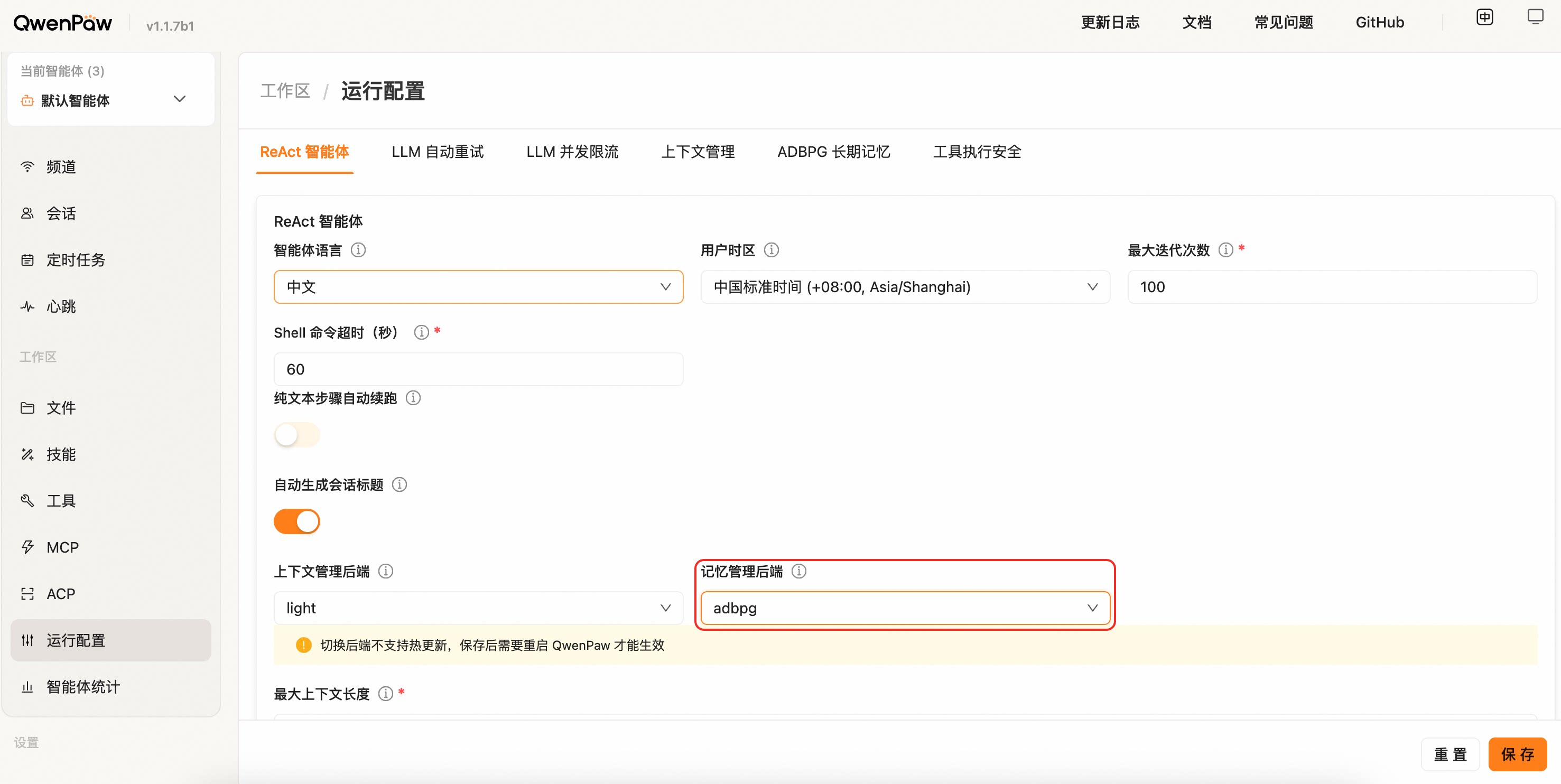
Open the agent's "Running Config" tab in the Console, locate the "Long-term Memory Management Backend" dropdown, choose `adbpg`, and fill in `REST Base URL` and `REST API Key` under the "ADBPG Long-term Memory" tab.
|
||
|
||
|
||
|
||
> ⚠️ Switching the backend does not support hot reload. After saving, restart QwenPaw for the change to take effect (the page also shows a yellow banner reminder).
|
||
|
||
> Migration note: ADBPG direct SQL mode has been removed. Old fields such as
|
||
> `api_mode: "sql"`, `host`, `port`, `user`, `password`, `dbname`, and LLM /
|
||
> Embedding settings are ignored; configure `rest_base_url` and `rest_api_key`
|
||
> instead, then restart QwenPaw.
|
||
|
||
| Field | Description | Default |
|
||
| --------------------------- | ---------------------------------------------------------------------------------------- | ------------------------------------- |
|
||
| `rest_base_url` | REST API URL of the ADBPG memory service | `""` |
|
||
| `rest_api_key` | Access key for the REST API | `""` |
|
||
| `memory_isolation` | Memory isolation mode: `true` for per-agent, `false` for shared | `true` |
|
||
| `search_timeout` | Memory search timeout (seconds) | `10.0` |
|
||
| `auto_memory_search_config` | Auto memory search configuration; same shape as ReMe Light's `auto_memory_search_config` | `{"enabled": true, "max_results": 3}` |
|
||
|
||
**Configuration example:**
|
||
|
||
The full configuration can be written into `running.adbpg_memory_config` of `agent.json`:
|
||
|
||
```json
|
||
{
|
||
"running": {
|
||
"memory_manager_backend": "adbpg",
|
||
"adbpg_memory_config": {
|
||
"rest_base_url": "https://your-adbpg-memory-api.example.com",
|
||
"rest_api_key": "your-rest-api-key",
|
||
"memory_isolation": true,
|
||
"search_timeout": 10.0,
|
||
"auto_memory_search_config": {
|
||
"enabled": true,
|
||
"max_results": 3
|
||
}
|
||
}
|
||
}
|
||
}
|
||
```
|
||
|
||
> 💡 When you fill these fields in the Console "Running Config" page, the framework writes them into `agent.json` automatically — no need to edit the file by hand.
|
||
|
||
---
|
||
|
||
## Related Pages
|
||
|
||
- [Memory-Evolving & Proactive Interaction](./memory-evolving-and-proactive) — Auto-Memory, Auto-Dream, Auto-Memory-Search, Proactive complete workflow
|
||
- [Introduction](./intro) — What this project can do
|
||
- [Console](./console) — Manage memory and configuration in the console
|
||
- [Skills](./skills) — Built-in and custom capabilities
|
||
- [Configuration & Working Directory](./config) — Working directory and config
|