
1141 lines
64 KiB
Markdown
1141 lines
64 KiB
Markdown
# Security
|
||
|
||
QwenPaw includes built-in security features to protect your agent from malicious inputs and unsafe skills. These are configured in the Console under **Settings → Security**, or via `config.json`.
|
||
|
||
## Overview
|
||
|
||
QwenPaw's security system consists of five core security layers:
|
||
|
||
```
|
||
Security Architecture:
|
||
├─ Governance Policy — Runtime tool call protection
|
||
│ Detects dangerous command patterns, injection attacks, and malicious operations
|
||
│ using YAML regex rules plus a quote-aware shell evasion guardian
|
||
│
|
||
├─ File Guard — Sensitive file access control
|
||
│ Blocks agent access to protected files and directories
|
||
│
|
||
├─ Sandbox — OS kernel-level execution isolation
|
||
│ Confines shell commands to a restricted filesystem view using
|
||
│ platform-native mechanisms (Seatbelt / bubblewrap / Landlock / AppContainer / Restricted_token)
|
||
│
|
||
├─ Skill Scanner — Pre-activation skill security scanning
|
||
│ Scans for malicious code, hardcoded secrets, and security threats
|
||
│ before skills are enabled
|
||
│
|
||
└─ Access Policy — Declarative access policy
|
||
Controls who can invoke which capabilities under what conditions
|
||
with per-tool granularity and source-aware rules
|
||
```
|
||
|
||
**Additional feature**: Web Authentication — Optional login protection for the Console interface
|
||
|
||
**Key concepts**:
|
||
|
||
- **Governance Policy** inspects tool calls in real-time before execution, using YAML regex rules and a dedicated shell evasion guardian to detect dangerous patterns
|
||
- **File Guard** operates independently to protect sensitive files and directories from unauthorized access
|
||
- **Sandbox** executes shell commands inside an OS kernel-enforced isolation boundary, restricting filesystem access to only declared paths
|
||
- **Skill Scanner** runs before skills are enabled to detect malicious code and security threats
|
||
- **Access Policy** evaluates source, identity, and target for each capability invocation — deciding whether to allow, deny, or request human approval
|
||
- **Web Authentication** (optional) controls access to the Console interface
|
||
|
||
---
|
||
|
||
## Tool Guard
|
||
|
||
The **Tool Guard** scans tool parameters **before** the agent invokes a tool, detecting dangerous patterns such as command injection, path traversal, or data exfiltration attempts, and blocks potentially malicious operations.
|
||
|
||
### How it works
|
||
|
||
1. When the agent calls a tool, the Tool Guard inspects relevant parameters. Checks primarily target **`execute_shell_command`**, combining built-in **YAML rules** (regex signatures) with **`ShellEvasionGuardian`** (quote-aware heuristics for obfuscation and parser differentials).
|
||
2. Together they flag dangerous patterns, for example:
|
||
- `rm -rf /` — Dangerous file deletion
|
||
- SQL-injection-like fragments
|
||
- Command substitution `$(...)` or `` `...` ``
|
||
- Path traversal `../`
|
||
- Privilege escalation `sudo`, `su`
|
||
- Reverse shells, fork bombs, obfuscated flags, Unicode whitespace tricks, etc.
|
||
(Exact coverage depends on built-in and custom rules.)
|
||
3. Each rule has an independent severity level (CRITICAL, HIGH, MEDIUM, LOW, INFO)
|
||
4. For CRITICAL or HIGH findings: in the Console / interactive sessions, the tool call enters a pending-approval flow — you approve or reject before it runs. In non-interactive contexts without a session, findings are logged and execution may still proceed — use **`denied_tools`** to hard-block specific tools or tighten rules when needed.
|
||
|
||
### Configuration
|
||
|
||
In `config.json`:
|
||
|
||
```json
|
||
{
|
||
"security": {
|
||
"tool_guard": {
|
||
"enabled": true,
|
||
"guarded_tools": null,
|
||
"denied_tools": [],
|
||
"custom_rules": [],
|
||
"disabled_rules": [],
|
||
"shell_evasion_checks": {
|
||
"command_substitution": false,
|
||
"obfuscated_flags": false,
|
||
"backslash_escaped_whitespace": false,
|
||
"backslash_escaped_operators": false,
|
||
"newlines": false,
|
||
"comment_quote_desync": false,
|
||
"quoted_newline": false
|
||
}
|
||
}
|
||
}
|
||
}
|
||
```
|
||
|
||
| Field | Description |
|
||
| ---------------------- | ------------------------------------------------------------------------------------------------------------------------------------------------------------------------------------------------------------------------------------------------------------------------------------------------------------------------------------------------------------------------------------------------------------------------------------- |
|
||
| `enabled` | Enable or disable Tool Guard entirely. Can also be set via the `QWENPAW_TOOL_GUARD_ENABLED` environment variable (takes precedence). |
|
||
| `guarded_tools` | Specify guard scope:<br>• `null` (default) — guard all built-in tools<br>• `[]` — guard nothing<br>• `["tool_a", "tool_b"]` — guard only listed tools |
|
||
| `denied_tools` | Tools that are always blocked regardless of parameters. |
|
||
| `custom_rules` | User-defined regex rules (see format below). |
|
||
| `disabled_rules` | Built-in YAML rule IDs to disable (applies to `TOOL_CMD_*` rules only). |
|
||
| `shell_evasion_checks` | Per-check toggles for the shell evasion guardian. A dict mapping check names to `true`/`false`. **All checks default to `false` (disabled).** Toggle individual checks on from the Console under Settings → Security → Tool Guard, or set them here. Available keys: `command_substitution`, `obfuscated_flags`, `backslash_escaped_whitespace`, `backslash_escaped_operators`, `newlines`, `comment_quote_desync`, `quoted_newline`. |
|
||
|
||
#### Custom rule format
|
||
|
||
Each custom rule is a JSON object with the following fields:
|
||
|
||
```json
|
||
{
|
||
"id": "CUSTOM_RULE_ID",
|
||
"tools": ["execute_shell_command"],
|
||
"params": ["command"],
|
||
"category": "command_injection",
|
||
"severity": "HIGH",
|
||
"patterns": ["pattern1", "pattern2"],
|
||
"exclude_patterns": ["safe_pattern"],
|
||
"description": "Brief description of what this rule detects",
|
||
"remediation": "How to fix or avoid this issue"
|
||
}
|
||
```
|
||
|
||
| Field | Type | Required | Description |
|
||
| ------------------ | --------------- | -------- | ------------------------------------------------------------------------------------ |
|
||
| `id` | string | **Yes** | Unique identifier for this rule (use UPPERCASE_WITH_UNDERSCORES) |
|
||
| `tools` | string or array | No | Tool name(s) this rule applies to. Empty array or omitted means "all tools" |
|
||
| `params` | string or array | No | Parameter name(s) to scan. Empty array or omitted means "all string parameters" |
|
||
| `category` | string | **Yes** | Threat category (see available categories below) |
|
||
| `severity` | string | **Yes** | Severity level: `CRITICAL`, `HIGH`, `MEDIUM`, `LOW`, or `INFO` |
|
||
| `patterns` | array | **Yes** | Regular expressions to match dangerous patterns (case-insensitive) |
|
||
| `exclude_patterns` | array | No | Regular expressions to exclude (allowlist patterns that should NOT trigger the rule) |
|
||
| `description` | string | No | Human-readable description of the threat |
|
||
| `remediation` | string | No | Guidance on how to fix or avoid the issue |
|
||
|
||
**Available threat categories**: `command_injection`, `data_exfiltration`, `path_traversal`, `sensitive_file_access`, `network_abuse`, `credential_exposure`, `resource_abuse`, `prompt_injection`, `code_execution`, `privilege_escalation`
|
||
|
||
**Example custom rules**:
|
||
|
||
```json
|
||
{
|
||
"security": {
|
||
"tool_guard": {
|
||
"enabled": true,
|
||
"custom_rules": [
|
||
{
|
||
"id": "BLOCK_PRODUCTION_DB_ACCESS",
|
||
"tools": ["execute_shell_command"],
|
||
"params": ["command"],
|
||
"category": "sensitive_file_access",
|
||
"severity": "CRITICAL",
|
||
"patterns": ["psql.*prod", "mysql.*production"],
|
||
"description": "Prevent direct access to production databases",
|
||
"remediation": "Use read-only replica or staging database instead"
|
||
},
|
||
{
|
||
"id": "WARN_NPM_GLOBAL_INSTALL",
|
||
"tools": ["execute_shell_command"],
|
||
"params": ["command"],
|
||
"category": "resource_abuse",
|
||
"severity": "MEDIUM",
|
||
"patterns": ["npm\\s+install\\s+-g", "npm\\s+i\\s+-g"],
|
||
"exclude_patterns": ["npm\\s+install\\s+-g\\s+(typescript|eslint)"],
|
||
"description": "Warn about global npm installations",
|
||
"remediation": "Install packages locally in project dependencies"
|
||
}
|
||
]
|
||
}
|
||
}
|
||
}
|
||
```
|
||
|
||
### Execution level (approval_level)
|
||
|
||
Each agent has an `approval_level` field (in `agent.json`) that controls how Tool Guard handles findings:
|
||
|
||
| Level | Behavior |
|
||
| ---------- | ---------------------------------------------------------------------- |
|
||
| **STRICT** | All tool calls require manual approval before execution |
|
||
| **SMART** | Low-risk tool calls are auto-allowed; high-risk calls require approval |
|
||
| **AUTO** | Only tool calls flagged by guard rules require approval (default) |
|
||
| **OFF** | Tool Guard is disabled for this agent; all tool calls execute directly |
|
||
|
||
Configure in `agent.json`:
|
||
|
||
```json
|
||
{
|
||
"approval_level": "AUTO"
|
||
}
|
||
```
|
||
|
||
Or change it in the Console under **Settings → Agents** in the agent's configuration card.
|
||
|
||
### Console management
|
||
|
||
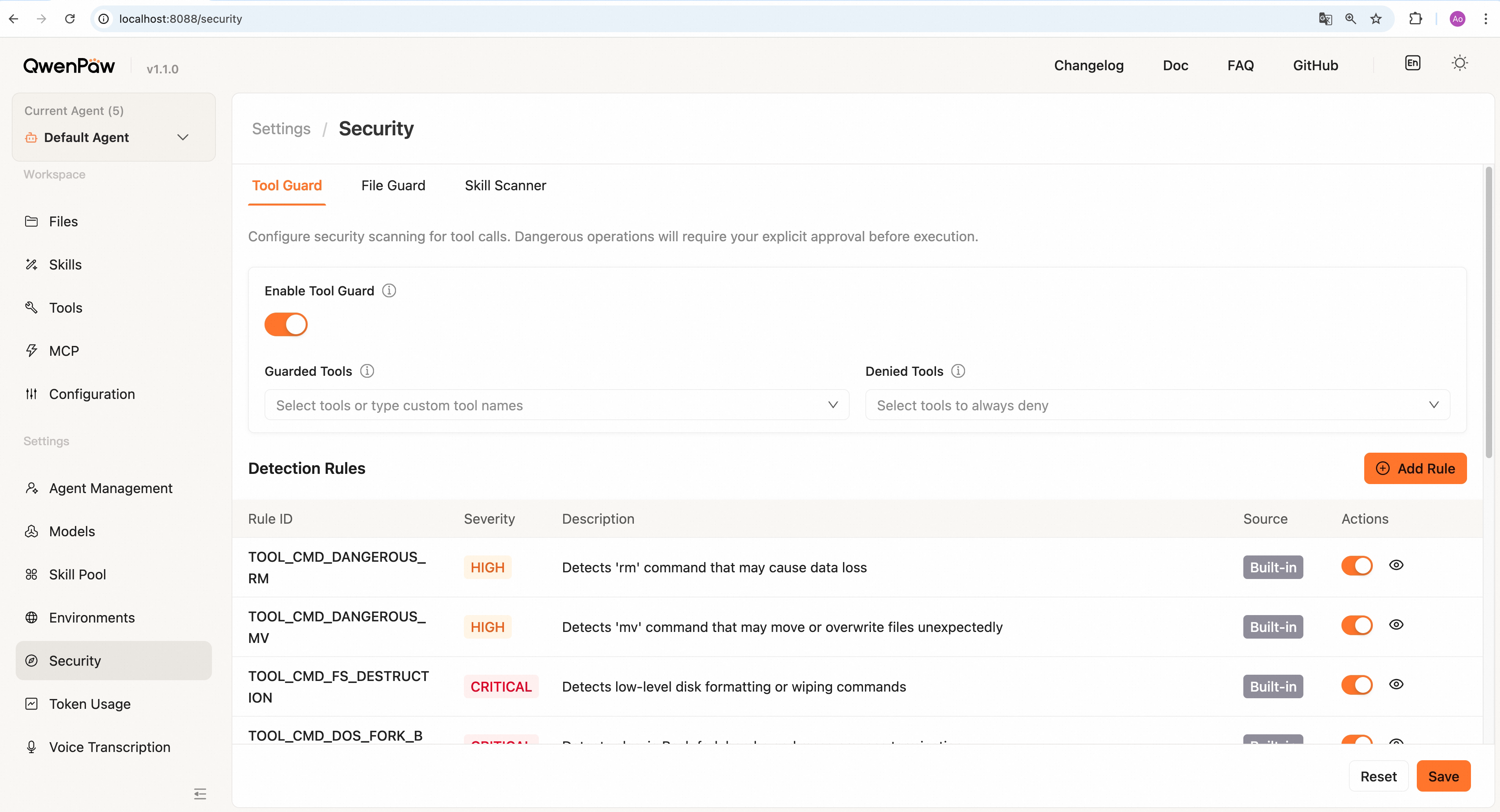
In the Console under **Settings → Security → Tool Guard** tab, you can:
|
||
|
||
|
||
|
||
- **Enable/disable Tool Guard** — Master switch; when disabled, all tool calls bypass checks
|
||
- **Select guard scope** — Leave empty to guard all tools, or specify a list of tools to guard
|
||
- **Set denied tools** — Configure tools that are unconditionally blocked and cannot be invoked at all
|
||
- **Manage rules** — View, add, edit, and disable rules:
|
||
- **Built-in rules** — System-provided security rules; individual rules can be disabled
|
||
- **Custom rules** — Add organization-specific detection rules with regex patterns and severity levels
|
||
- **Rule preview** — Click to preview detailed patterns and descriptions for each rule
|
||
- **Save configuration** — Click "Save" to persist changes; **changes take effect immediately without restart**
|
||
|
||
### Built-in Rules
|
||
|
||
Tool Guard includes the following built-in detection rules (for `execute_shell_command` tool):
|
||
|
||
**Command Injection & File Operations (HIGH):**
|
||
|
||
| Rule ID | Detection Target | Description |
|
||
| ----------------------------- | ------------------------ | -------------------------------------------------------- |
|
||
| `TOOL_CMD_DANGEROUS_RM` | `rm` command | Detects file removal operations that may cause data loss |
|
||
| `TOOL_CMD_DANGEROUS_MV` | `mv` command | Detects operations that may move or overwrite files |
|
||
| `TOOL_CMD_UNSAFE_PERMISSIONS` | `chmod -R 777`, `chattr` | Global permission changes or immutable flags |
|
||
|
||
**Low-Level Disk Operations (CRITICAL):**
|
||
|
||
| Rule ID | Detection Target | Description |
|
||
| ------------------------- | ------------------------------------------ | ---------------------------------------------------- |
|
||
| `TOOL_CMD_FS_DESTRUCTION` | `mkfs`, `dd of=/dev/`, block device writes | Detects low-level disk formatting or wiping commands |
|
||
|
||
**Resource Abuse (CRITICAL/HIGH):**
|
||
|
||
| Rule ID | Severity | Detection Target | Description |
|
||
| -------------------------- | -------- | ----------------------------------------------- | ----------------------------------------------- |
|
||
| `TOOL_CMD_DOS_FORK_BOMB` | CRITICAL | Fork bombs `:(){ :\|:& };:`, `kill -9 -1` | Detects fork bombs and mass process termination |
|
||
| `TOOL_CMD_SYSTEM_REBOOT` | CRITICAL | `reboot`, `shutdown`, `halt`, `init 0/6` | Terminates the host system |
|
||
| `TOOL_CMD_SERVICE_RESTART` | HIGH | `systemctl restart/stop`, `service ... restart` | Manages or disrupts system services |
|
||
| `TOOL_CMD_PROCESS_KILL` | HIGH | `pkill`, `killall`, `kill` (excludes `kill $$`) | Terminates processes that may be critical |
|
||
|
||
**Code Execution (CRITICAL/HIGH):**
|
||
|
||
| Rule ID | Severity | Detection Target | Description |
|
||
| ----------------------------- | -------- | ------------------------------------------------------------------------------ | ----------------------------------------------------------------------------------------------- |
|
||
| `TOOL_CMD_PIPE_TO_SHELL` | CRITICAL | `curl/wget ... \| bash/sh` patterns | Downloads and immediately executes remote scripts |
|
||
| `TOOL_CMD_OBFUSCATED_EXEC` | HIGH | `base64 -d \| bash` patterns | Executes base64-encoded commands |
|
||
| `TOOL_CMD_IFS_INJECTION` | HIGH | `$IFS`, `${...IFS...}` | Token splitting that can evade naive word-boundary checks |
|
||
| `TOOL_CMD_CONTROL_CHARS` | CRITICAL | Non-printable control characters (for example NUL) | Characters that can hide metacharacters from simple scans |
|
||
| `TOOL_CMD_UNICODE_WHITESPACE` | HIGH | NBSP, ideographic space, and other Unicode whitespace | Whitespace that parsers and Bash may treat differently |
|
||
| `TOOL_CMD_PROC_ENVIRON` | HIGH | `/proc/self/environ`, `/proc/<pid>/environ` | Reads process environment blobs (secrets, tokens), often chained with execution or exfiltration |
|
||
| `TOOL_CMD_JQ_SYSTEM` | HIGH | `jq` with `system(` | Shell execution embedded in jq programs |
|
||
| `TOOL_CMD_JQ_FILE_FLAGS` | HIGH | `jq` `-f` / `--from-file`, `--rawfile`, `--slurpfile`, `-L`, `--library-path` | Reading arbitrary files or loading external jq code paths |
|
||
| `TOOL_CMD_ZSH_DANGEROUS` | HIGH | `zmodload`, `emulate ... -c`, `sysopen` / `zpty` / `ztcp`, `zf_*`, `fc ... -e` | zsh builtins that enable raw I/O, network, or execution paths beyond typical binary checks |
|
||
|
||
**Privilege Escalation (CRITICAL/HIGH):**
|
||
|
||
| Rule ID | Severity | Detection Target | Description |
|
||
| ------------------------------- | -------- | -------------------------------------------- | --------------------------------------------------- |
|
||
| `TOOL_CMD_PRIVILEGE_ESCALATION` | CRITICAL | `sudo`, `su`, `doas`, `pkexec` | Executes commands with elevated privileges |
|
||
| `TOOL_CMD_SYSTEM_TAMPERING` | HIGH | `crontab`, `authorized_keys`, `/etc/sudoers` | Accesses cron jobs, SSH keys, or sudo configuration |
|
||
|
||
**Network Abuse (CRITICAL):**
|
||
|
||
| Rule ID | Detection Target | Description |
|
||
| ------------------------ | ---------------------------------- | --------------------------------------------- |
|
||
| `TOOL_CMD_REVERSE_SHELL` | `/dev/tcp`, `nc -e`, `socat EXEC:` | Establishes reverse shells or network tunnels |
|
||
|
||
### Shell evasion guardian
|
||
|
||
The engine also runs **`ShellEvasionGuardian`** on `execute_shell_command`. It tracks quoting state to catch obfuscation that pure line- or regex-only checks can miss (for example command substitution outside single quotes, `$'...'` / `$"..."` tricks, backslash-escaped whitespace or shell operators—with a carve-out for common `find ... -exec ... {} \;`—raw newlines or `\r` that split commands while skipping heredocs, `#` comment / quote desync, and quoted newlines followed by `#`-looking lines). Reported rule IDs (severity **HIGH**):
|
||
|
||
| Rule ID | Description |
|
||
| ------------------------------------ | ---------------------------------------------------------------------------- |
|
||
| `SHELL_EVASION_COMMAND_SUBSTITUTION` | Backticks or command / process substitution–style patterns outside `'`...`'` |
|
||
| `SHELL_EVASION_OBFUSCATED_FLAGS` | ANSI-C or locale quoting, empty-quote flag tricks, or quoted flag tokens |
|
||
| `SHELL_EVASION_BACKSLASH_WHITESPACE` | Backslash-escaped space or tab outside quotes |
|
||
| `SHELL_EVASION_BACKSLASH_OPERATOR` | Backslash before `; \| & < >` outside quotes |
|
||
| `SHELL_EVASION_NEWLINE` | Carriage return or unquoted newline before further command text |
|
||
| `SHELL_EVASION_COMMENT_QUOTE_DESYNC` | Quote characters inside an unquoted `#` comment line |
|
||
| `SHELL_EVASION_QUOTED_NEWLINE` | Newline inside quotes where the next segment looks like a `#` comment line |
|
||
|
||
**Configuration note:** `disabled_rules` in `config.json` applies only to YAML rule IDs (typically `TOOL_CMD_*`). It does **not** control `SHELL_EVASION_*` findings. Shell evasion checks are controlled independently via the `shell_evasion_checks` config (see below). Turning off Tool Guard entirely disables all guardians, including this one.
|
||
|
||
**Usage recommendations**:
|
||
|
||
- Keep CRITICAL level rules enabled; these represent the most dangerous operations
|
||
- HIGH level rules can be adjusted based on actual use cases; some legitimate operations may trigger them
|
||
- Use `disabled_rules` config to disable YAML `TOOL_CMD_*` rules that don't apply to your use case
|
||
- Use `shell_evasion_checks` to toggle individual shell evasion checks (all disabled by default)
|
||
- Use `custom_rules` to add organization-specific security rules
|
||
|
||
---
|
||
|
||
## File Guard
|
||
|
||
The **File Guard** blocks agent tools from accessing sensitive files and directories. It runs automatically on **every tool call**, scanning all file-path-related parameters to enforce a deny list of protected paths.
|
||
|
||
### How it works
|
||
|
||
File Guard operates as the "File Path Guardian" within the Tool Guard engine, working alongside the Rule-based Guardian:
|
||
|
||
1. **Independent operation** — File Guard checks every tool call even when Tool Guard is disabled (`tool_guard.enabled = false`), as long as `file_guard.enabled = true`
|
||
2. **Multi-scenario detection** — Uses different path extraction strategies for different tools:
|
||
- **Known file tools** (`read_file`, `write_file`, `edit_file`, etc.) — Directly checks the `file_path` parameter
|
||
- **Shell commands** (`execute_shell_command`) — Extracts file paths from the command string, including redirection targets (like `>`, `>>`, `<`)
|
||
- **Other tools** — Scans all string parameters that look like file paths
|
||
3. **Path normalization** — Automatically handles relative paths, `~` expansion, and converts to absolute paths for matching
|
||
4. **Recursive directory protection** — Paths ending with `/` are treated as directories; all files and subdirectories within are recursively blocked
|
||
5. **Blocking mechanism** — When a match is found, the tool call is blocked with a HIGH-severity finding
|
||
|
||
**Default protection**: The `{WORKING_DIR}.secret/` directory (which stores API keys, authentication credentials, and provider configurations) is included in the sensitive-file list by default. By default, `WORKING_DIR` is `~/.qwenpaw/`, making the full path `~/.qwenpaw.secret/`.
|
||
|
||
### Configuration
|
||
|
||
In `config.json`:
|
||
|
||
```json
|
||
{
|
||
"security": {
|
||
"file_guard": {
|
||
"enabled": true,
|
||
"sensitive_files": ["~/.ssh/", "/etc/passwd", "~/.qwenpaw.secret/"]
|
||
}
|
||
}
|
||
}
|
||
```
|
||
|
||
| Field | Description |
|
||
| ----------------- | ------------------------------------------------------------------------------------------------------------------------------------------------------------------------------------------------------------------------------------------- |
|
||
| `enabled` | Enable or disable File Guard (default: `true`). When disabled, file path checks are skipped. |
|
||
| `sensitive_files` | List of file/directory paths to block from tool access. Supports:<br>• Absolute paths: `/etc/passwd`<br>• Relative paths: `secrets/api_keys.json`<br>• User home: `~/.ssh/`<br>• Directory guards: ending with `/` for recursive protection |
|
||
|
||
**Path handling rules**:
|
||
|
||
- Relative paths are resolved relative to the current workspace directory
|
||
- `~` is automatically expanded to the user's home directory
|
||
- All paths are normalized to absolute paths for matching
|
||
- Directory paths (ending with `/`) recursively protect all contents within
|
||
|
||
### Console management
|
||
|
||
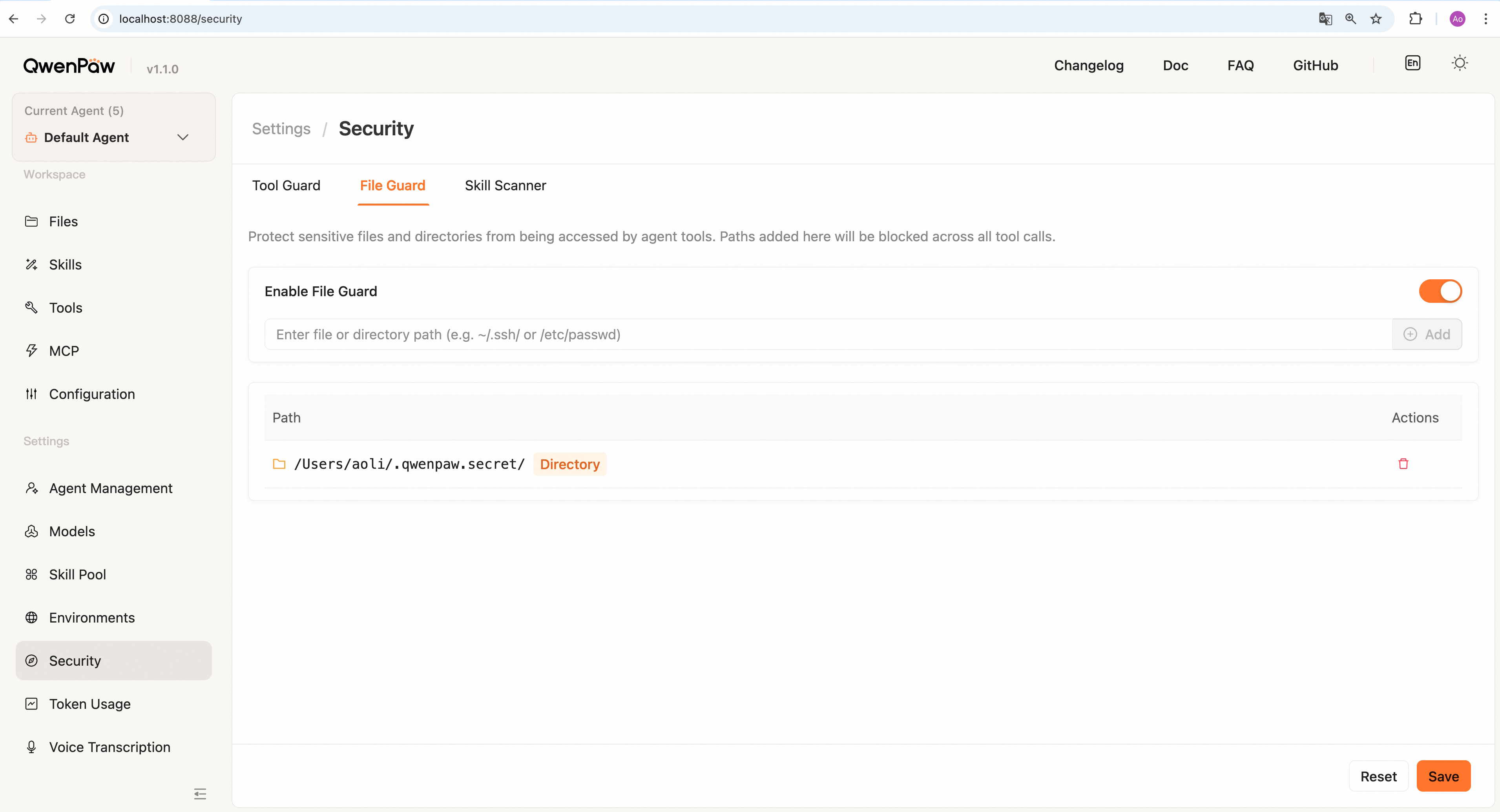
In the Console under **Settings → Security → File Guard** tab, you can:
|
||
|
||
|
||
|
||
- **Enable/disable File Guard** — Independent toggle; controls file protection without affecting other Tool Guard features
|
||
- **View protection list** — Table display of all protected paths:
|
||
- Folder icon identifies directory protection
|
||
- File icon identifies individual file protection
|
||
- Orange tag highlights directory types
|
||
- **Add protected paths**:
|
||
- Enter file or directory path in the input box
|
||
- Supports absolute paths, relative paths, user home (`~`)
|
||
- Ending with `/` protects entire directory and its contents
|
||
- Press Enter or click "Add" to confirm
|
||
- **Remove protection** — Click the delete button to remove paths that no longer need protection
|
||
- **Save configuration** — Click "Save" to persist changes to `config.json`; **changes take effect immediately**
|
||
- **Reset changes** — Click "Reset" to revert to the last saved state
|
||
|
||
---
|
||
|
||
## Sandbox
|
||
|
||
The **Sandbox** provides OS kernel-level execution isolation for shell commands. When the governance layer decides a tool call should run in a sandbox, commands execute inside a restricted filesystem view where only explicitly declared paths are accessible.
|
||
|
||
### How it works
|
||
|
||
The sandbox sits between the governance decision and actual command execution:
|
||
|
||
```
|
||
Tool call flow:
|
||
1. Governance Policy → pattern detection + policy evaluation (ALLOW / DENY / ASK / SANDBOX_FALLBACK)
|
||
2. Sandbox → kernel-enforced execution isolation (runtime)
|
||
3. Result → violation detection + output capture
|
||
```
|
||
|
||
**Division of responsibility**:
|
||
|
||
- **Governance Policy** = pattern detection + rule-based policy evaluation before execution (regex signatures, shell evasion heuristics, user/builtin rules)
|
||
- **File Guard** = path-level access control (blocks specific files/dirs)
|
||
- **Sandbox** = runtime kernel isolation (the command literally cannot see or write to paths outside the whitelist)
|
||
|
||
Even if a command passes Tool Guard and File Guard checks, the sandbox ensures it cannot access anything beyond its declared filesystem view at the OS level.
|
||
|
||
### Supported platforms
|
||
|
||
QwenPaw automatically detects the best available sandbox backend on startup:
|
||
|
||
| Platform | Backend | Mechanism | Detection |
|
||
| -------- | -------------------------------------------- | ------------------------------------------------------ | ---------------------------------------------------- |
|
||
| macOS | **Seatbelt** | `sandbox-exec` with S-expression profiles | `sandbox-exec` binary on PATH |
|
||
| Linux | **Bubblewrap** (preferred) | Mount namespaces + user namespaces + PID namespace | `bwrap` binary + user namespace support |
|
||
| Linux | **Landlock** (fallback) | Landlock LSM kernel module (5.13+) | Kernel version + LSM probe + ABI syscall |
|
||
| Windows | **AppContainer** (`allow_read_all=False`) | AppContainer profile + `icacls` ACL enforcement | Windows 10+ (build 10240) + `icacls.exe` on PATH |
|
||
| Windows | **Restricted_token** (`allow_read_all=True`) | Dedicated user + restricted token + WFP firewall rules | Windows 10+ (build 10240); administrator recommended |
|
||
| Any | **None** | No isolation (passthrough) | Used when no backend is available |
|
||
|
||
**Probe priority on Linux**: bubblewrap > Landlock > None. If `bwrap` is installed and user namespaces work, bubblewrap is chosen. Otherwise falls back to Landlock if the kernel supports it.
|
||
|
||
**Windows backend selection**: The backend is determined by the `allow_read_all` setting. When `allow_read_all=False` (deny-all model), AppContainer is used — only explicitly declared paths are readable. When `allow_read_all=True` (deny-list model, the default), Restricted_token is used — the entire filesystem is readable but writes are restricted to declared mounts via a restricted token with `CreateRestrictedToken` in Restricted_token mode.
|
||
|
||
**Capability comparison**:
|
||
|
||
| Capability | Seatbelt (macOS) | Bubblewrap (Linux) | Landlock (Linux) | AppContainer (Windows) | Restricted_token (Windows) |
|
||
| ------------------------ | ------------------ | ------------------------ | -------------------- | --------------------------- | -------------------------- |
|
||
| Filesystem read control | Yes | Yes | Yes | Yes (deny-all + ACL grants) | Yes |
|
||
| Filesystem write control | Yes | Yes | Yes | Yes | Yes (restricted token) |
|
||
| deny_paths invisible | No (access denied) | Yes (not mounted) | No (access denied) | No (access denied) | No (access denied) |
|
||
| PID namespace isolation | No | Yes | No | No | No |
|
||
| Minimal /dev | Yes (allowlist) | Yes (synthetic devtmpfs) | No | N/A | N/A |
|
||
| Network control | Yes (allow/deny) | Planned | No (requires ABI v4) | Yes (allow/deny) | Yes (WFP firewall rules) |
|
||
|
||
### Isolation model
|
||
|
||
The sandbox uses a **deny-default whitelist** model:
|
||
|
||
1. **Base filesystem**: By default, everything is either read-only (`allow_read_all=True`) or invisible (`allow_read_all=False`)
|
||
2. **Writable paths**: Only explicitly declared `mounts` with `writable=True` can be written to (typically just the workspace directory)
|
||
3. **Denied paths**: Paths in `deny_paths` are blocked even if they would otherwise be readable:
|
||
- Bubblewrap: path is not mounted at all (invisible, `ls` shows nothing)
|
||
- Landlock/Seatbelt: access returns `Permission denied`
|
||
4. **Minimal /dev**: Only essential device nodes are available (`/dev/null`, `/dev/zero`, `/dev/urandom`, `/dev/tty`)
|
||
5. **PID isolation** (Bubblewrap only): processes inside the sandbox cannot see host PIDs
|
||
|
||
### Configuration
|
||
|
||
Sandbox configuration is compiled automatically by the governance policy engine. Users typically do not need to set these values manually. The key fields are:
|
||
|
||
| Field | Type | Default | Description |
|
||
| ----------------- | ------ | --------------------------- | ------------------------------------------------------------------ |
|
||
| `mode` | string | auto-detected | `seatbelt`, `bubblewrap`, `landlock`, `appcontainer`, or `none` |
|
||
| `workspace_dir` | string | agent workspace | Primary working directory (always writable) |
|
||
| `mounts` | list | workspace only | Declared filesystem paths with permissions |
|
||
| `deny_paths` | list | `["~/.ssh", "~/.aws", ...]` | Sensitive paths to block |
|
||
| `allow_read_all` | bool | `true` | If true, entire filesystem is readable by default (deny-list mode) |
|
||
| `network_allow` | list | `["*"]` | Network access policy (currently allows all) |
|
||
| `timeout_seconds` | int | `30` | Maximum execution time before kill |
|
||
| `env_vars` | dict | `{}` | Additional environment variables for sandboxed process |
|
||
|
||
**MountSpec** entries in `mounts`:
|
||
|
||
| Field | Type | Default | Description |
|
||
| ------------ | ------ | ------- | ------------------------------------- |
|
||
| `path` | string | — | Filesystem path |
|
||
| `writable` | bool | `false` | Allow write access |
|
||
| `executable` | bool | `true` | Allow executing binaries (macOS only) |
|
||
|
||
### Violation detection
|
||
|
||
When a sandboxed command attempts to access a path outside its allowed view, the OS kernel blocks the operation. QwenPaw detects these violations by matching stderr patterns:
|
||
|
||
| Platform | Detection patterns |
|
||
| ---------------- | ---------------------------------------------------------------------------------------- |
|
||
| Seatbelt | `deny(N) file-read-data`, `Sandbox:`, `sandbox-exec:`, `Operation not permitted` |
|
||
| Bubblewrap | `Permission denied`, `bwrap:`, `Operation not permitted`, `EACCES` |
|
||
| Landlock | `Permission denied`, `Operation not permitted` |
|
||
| AppContainer | `Access is denied`, `error 5`, `0x80070005`, `Permission denied`, `拒绝访问`, `权限不足` |
|
||
| Restricted_token | `Access is denied`, `error 5`, `0x80070005`, `Permission denied`, `拒绝访问`, `权限不足` |
|
||
|
||
When a violation is detected:
|
||
|
||
1. The `sandbox_violation` field is populated in the execution result
|
||
2. The governance layer logs the violation
|
||
3. Depending on policy, the agent may be prompted to request user approval for expanded access
|
||
|
||
### Current limitations
|
||
|
||
- **Network isolation**: Not implemented in the current version. All sandboxed processes have full network access regardless of `network_allow` settings. Network namespace isolation (`--unshare-net` for bubblewrap) is planned.
|
||
- **Resource limits**: `max_processes` and `max_memory_mb` fields exist in the config but are not enforced by any current backend.
|
||
- **Windows AppContainer** (`allow_read_all=False`): Requires administrator privileges for initial ACL setup. The AppContainer profile is preserved for reuse across invocations with the same configuration.
|
||
- **Windows AppContainer file deletion limitation** (`allow_read_all=False`): Sandboxed processes in AppContainer mode may be unable to delete files within the workspace. This does not affect `allow_read_all=True` (Restricted_token) mode. A solution is under investigation.
|
||
- **Windows Restricted_token** (`allow_read_all=True`): Full isolation (dedicated local user, WFP firewall rules) requires administrator privileges. When running without administrator privileges, an unelevated sandbox mode is used instead — it provides write restrictions via `CreateRestrictedToken` but with limited isolation compared to the full sandbox. For maximum security, running as administrator is recommended.
|
||
- **Windows minimum version**: Both Windows backends require **Windows 10 version 1507 (build 10240)** or later. Earlier Windows versions (Windows 7, 8, 8.1) do not support the isolation mechanisms and will fall back to `mode=none` (no isolation).
|
||
- **Windows system directory ACL restrictions** (AppContainer only): The `icacls` ACL setup cannot modify permissions on certain protected system directories such as `C:\Program Files`, `C:\Program Files (x86)`, `C:\Windows`, and `C:\Windows\System32`. These directories are protected by Windows Resource Protection (WRP) and TrustedInstaller ownership.
|
||
- **deny_paths for files (Bubblewrap)**: Individual files in `deny_paths` appear as empty (bound to `/dev/null`) rather than non-existent. Directory-level deny uses `--tmpfs` and is truly invisible.
|
||
|
||
### Troubleshooting
|
||
|
||
**macOS: `sandbox-exec` reports syntax error**
|
||
|
||
The Seatbelt profile uses S-expression syntax. If you see `expecting ')'` errors, this typically indicates a malformed profile. Check that the `deny_paths` entries do not contain special characters (quotes, newlines, backslashes).
|
||
|
||
**Linux: bwrap probe failed**
|
||
|
||
Bubblewrap requires user namespace support. Check:
|
||
|
||
```bash
|
||
# Verify bwrap is installed
|
||
which bwrap
|
||
|
||
# Check user namespaces are enabled
|
||
cat /proc/sys/kernel/unprivileged_userns_clone
|
||
# Should output: 1
|
||
|
||
# Manual probe
|
||
bwrap --ro-bind / / --dev /dev --unshare-user --unshare-pid --proc /proc -- /bin/echo OK
|
||
```
|
||
|
||
If user namespaces are disabled (Docker containers, some hardened kernels), QwenPaw automatically falls back to Landlock.
|
||
|
||
**Windows: AppContainer ACL setup failed**
|
||
|
||
AppContainer (`allow_read_all=False`) requires administrator privileges for `icacls` ACL operations. If you see warnings about failed ACL setup:
|
||
|
||
1. Run QwenPaw as administrator (right-click → Run as administrator)
|
||
2. Verify `icacls.exe` is on your PATH (ships with all Windows editions)
|
||
3. Use `scripts/cleanup_windows_sandbox.py` to remove stale AppContainer profiles and ACLs
|
||
|
||
**Windows: Restricted_token user provisioning failed**
|
||
|
||
Restricted_token (`allow_read_all=True`) uses dedicated local user accounts and WFP firewall rules for full isolation, which requires administrator privileges. Without administrator privileges, QwenPaw automatically falls back to the unelevated sandbox mode with limited isolation. If you see errors about user creation or firewall setup:
|
||
|
||
1. The unelevated sandbox is still active and provides basic write restrictions
|
||
2. For full sandbox protection, run QwenPaw as administrator (right-click → Run as administrator)
|
||
3. Use `scripts/cleanup_windows_sandbox.py` to remove stale sandbox users and firewall rules
|
||
|
||
**Windows: Minimum version not met**
|
||
|
||
Both Windows sandbox backends require Windows 10 (build 10240) or later. If you see `"AppContainer requires Windows 10+"` in the probe output, you are running an unsupported Windows version. Upgrade to Windows 10 or later to use sandbox isolation. On older systems, QwenPaw falls back to `mode=none` (no kernel isolation).
|
||
|
||
**Windows: ACL grant fails on system directories (e.g. Program Files)**
|
||
|
||
If you see `icacls` warnings for paths like `C:\Program Files` or `C:\Windows`, this is expected (AppContainer mode only). These directories are owned by TrustedInstaller and protected by Windows Resource Protection — even administrators cannot modify their ACLs.
|
||
|
||
**Verifying sandbox is active**
|
||
|
||
Check the governance log (`qwenpaw.log`) for lines containing:
|
||
|
||
```
|
||
governance decision: tool=Bash target="..." action=sandbox_fallback sandbox=bubblewrap ...
|
||
```
|
||
|
||
The `sandbox=` field shows which backend is actually being used. If it shows `-`, sandbox is not active for that call.
|
||
|
||
---
|
||
|
||
## Skill Scanner
|
||
|
||
The **Skill Scanner** automatically scans skills for security threats before they are enabled or installed, detecting risk patterns such as command injection, data exfiltration, hardcoded secrets, and social engineering to protect the system from malicious skills.
|
||
|
||
### How it works
|
||
|
||
1. **Trigger timing** — The scanner runs before activating a skill when:
|
||
- Creating a new skill
|
||
- Enabling a previously disabled skill
|
||
- Importing a skill from Skill Hub
|
||
2. **Scanning mechanism**:
|
||
- Uses YAML regex signature rules to detect dangerous patterns in skill files
|
||
- Defaults to PatternAnalyzer based on the built-in signature library
|
||
- Supports custom scan policies (ScanPolicy) and rules
|
||
3. **Smart caching** — Scan results are cached based on file modification time (mtime); unchanged skills are not rescanned
|
||
4. **Timeout protection** — Configurable timeout (default 30s) prevents scans from blocking indefinitely
|
||
5. **File safety**:
|
||
- Automatically skips symbolic links to prevent path traversal attacks
|
||
- Verifies all file real paths stay within the skill directory boundary
|
||
- Skips binary and archive files by default (images, fonts, archives, etc.)
|
||
|
||
### Scanner modes
|
||
|
||
| Mode | Behavior |
|
||
| --------- | ----------------------------------------------------------------------------------------------------------------------- |
|
||
| **Block** | Scan and block unsafe skills. The operation fails with a detailed error; skill cannot be enabled. |
|
||
| **Warn** | Scan and record findings, but allow the skill to proceed. Shows warning notification and logs to Scan Alerts. (default) |
|
||
| **Off** | Disable scanning entirely; all skills pass through directly. |
|
||
|
||
**Configuration priority**: Environment variable `QWENPAW_SKILL_SCAN_MODE` > Console settings > `config.json`
|
||
|
||
Valid values: `block`, `warn`, `off`
|
||
|
||
### Scan Alerts
|
||
|
||
All scan findings (both blocked and warned) are recorded in the **Scan Alerts** tab. From the Console you can:
|
||
|
||
- **View detailed findings** — Click the "eye" icon to see specific findings for each alert:
|
||
- Finding title and description
|
||
- File path and line number where the issue occurs
|
||
- Matched dangerous pattern
|
||
- **Add to whitelist** — Click the "shield" icon to add the skill to the whitelist, bypassing future scans for that exact content version
|
||
- **Remove alert** — Click the "trash" icon to delete a single alert record
|
||
- **Clear all** — Click the "Clear All" button to batch delete all alert records
|
||
|
||
Alert records include:
|
||
|
||
- Skill name
|
||
- Action type (blocked/warned)
|
||
- Detection time
|
||
- Detailed findings list
|
||
|
||
### Whitelist
|
||
|
||
**Where to add:** In the Console, go to **Settings → Security → Skill Scanner**, open the **Scan Alerts** tab, and click the shield icon (**Add to Whitelist**) on the row for that skill’s alert. Entries appear under the **Whitelist** tab for review and removal (see **Scan Alerts** and **Console management** above).
|
||
**Prerequisite:** The skill must have been scanned and show up as **blocked** or **warned** before it appears in Scan Alerts; you cannot add a whitelist entry from the Console with no prior alert. Advanced: edit `security.skill_scanner.whitelist` in `config.json` (see **Configuration** below).
|
||
|
||
Whitelisted skills bypass the security scan. The whitelist mechanism is based on **content hash verification**:
|
||
|
||
- Each whitelist entry contains:
|
||
- Skill name
|
||
- SHA-256 content hash (calculated from all skill file contents)
|
||
- Added timestamp
|
||
- **Version locking** — If any skill file changes, the content hash changes, the whitelist entry becomes invalid, and the skill will be rescanned
|
||
- **Remove from whitelist** — Click the delete button to remove a whitelist entry; the system automatically disables the skill and prompts for rescanning
|
||
|
||
The whitelist is useful for:
|
||
|
||
- Self-developed skills that have been verified as safe
|
||
- False positives (scanner incorrectly identified)
|
||
- Trusted skills that need to bypass specific detections
|
||
|
||
### Console management
|
||
|
||
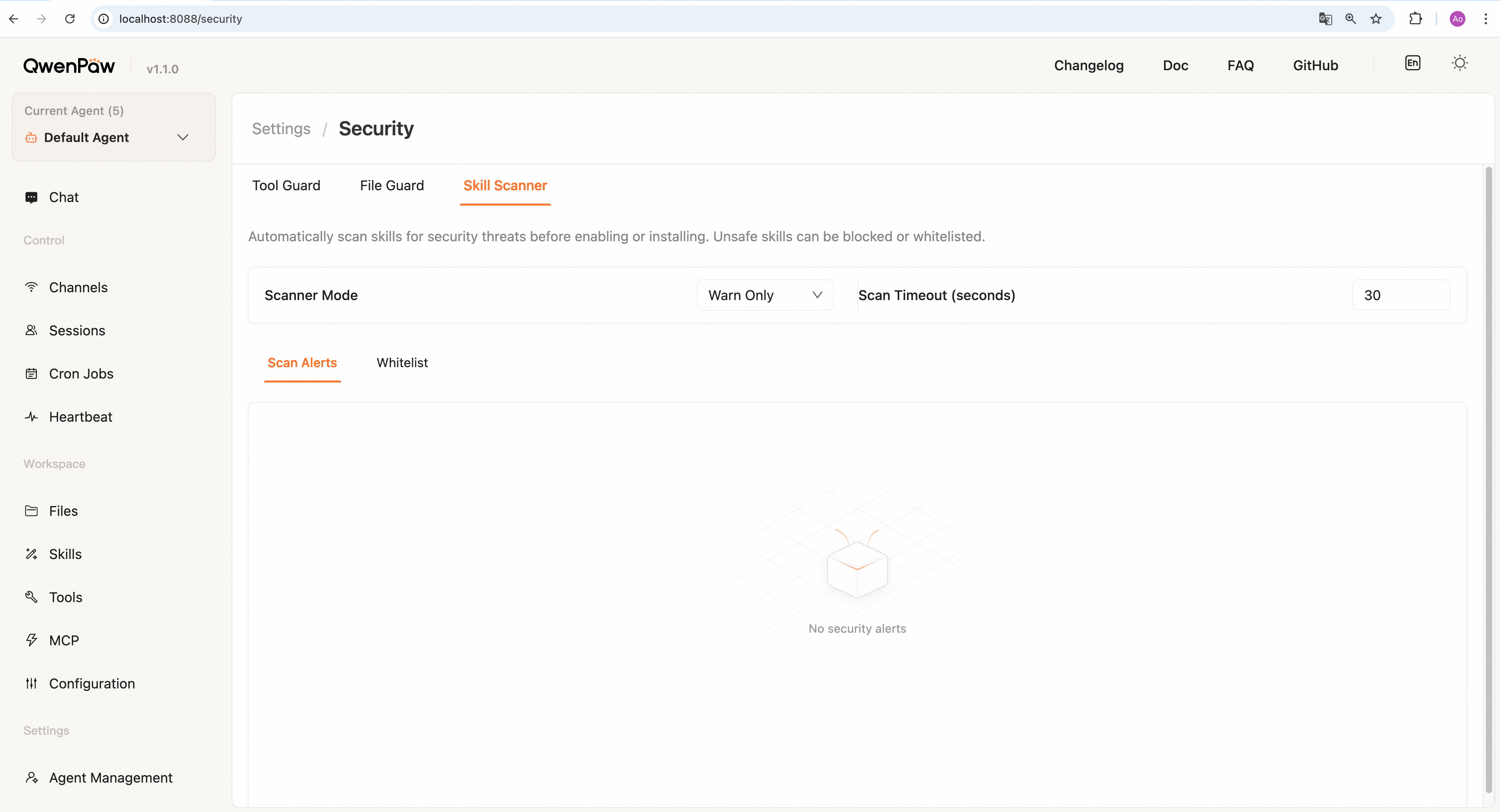
In the Console under **Settings → Security → Skill Scanner** tab, you can:
|
||
|
||
|
||
|
||
**Configuration area**:
|
||
|
||
- **Scanner mode** — Dropdown to select "Block", "Warn", or "Off"
|
||
- **Timeout** — Set the maximum duration for scanning a single skill (5-300 seconds); stops after timeout
|
||
|
||
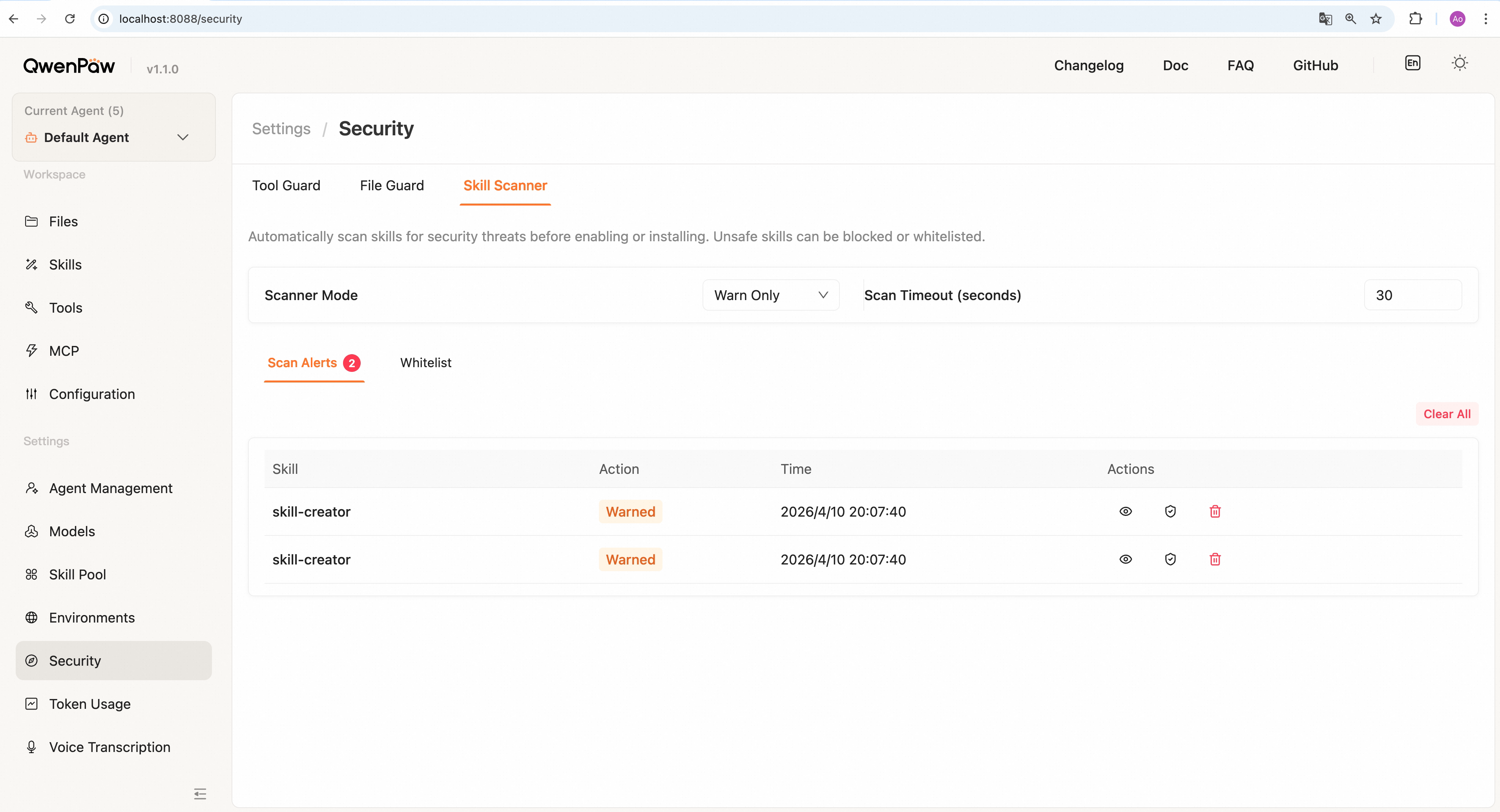
**Scan Alerts tab** (shows badge count when alerts exist):
|
||
|
||
|
||
|
||
- View all blocked and warned records
|
||
- Click eye icon to view detailed findings
|
||
- Click shield icon to add skill to whitelist
|
||
- Click trash icon to delete individual records
|
||
- Use "Clear All" button for batch deletion
|
||
|
||
**Whitelist tab** (shows badge count when entries exist):
|
||
|
||
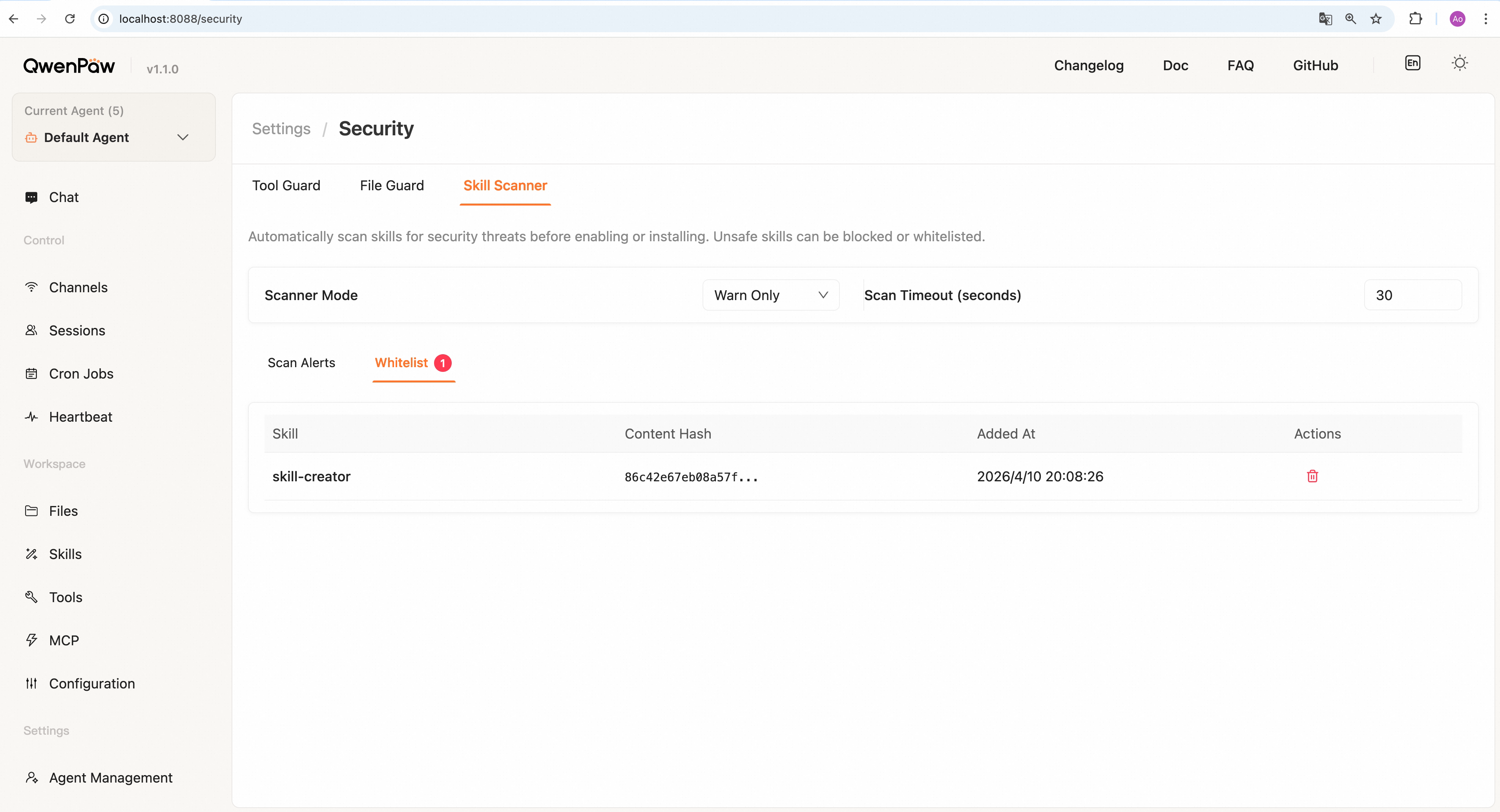
|
||
|
||
- View all whitelisted skills
|
||
- Shows skill name, content hash (first 16 chars), added time
|
||
- Click delete button to remove from whitelist (automatically disables skill)
|
||
|
||
**Note**: Changes to scanner mode and timeout are automatically saved and **take effect immediately**; no additional save button required.
|
||
|
||
### Custom rules (Advanced)
|
||
|
||
For scenarios requiring deep customization, the scanner supports programmatic configuration:
|
||
|
||
The scanner uses YAML rule files in `src/pineagents/security/skill_scanner/rules/signatures/`. You can customize the scan policy via a YAML policy file:
|
||
|
||
```python
|
||
from qwenpaw.security.skill_scanner import SkillScanner
|
||
from qwenpaw.security.skill_scanner.scan_policy import ScanPolicy
|
||
|
||
policy = ScanPolicy.from_yaml("my_org_policy.yaml")
|
||
scanner = SkillScanner(policy=policy)
|
||
```
|
||
|
||
Built-in signature categories:
|
||
|
||
- `command_injection` — Command injection
|
||
- `data_exfiltration` — Data exfiltration
|
||
- `hardcoded_secrets` — Hardcoded secrets
|
||
- `prompt_injection` — Prompt injection
|
||
- `social_engineering` — Social engineering
|
||
- `supply_chain_attack` — Supply chain attacks
|
||
- `obfuscation` — Code obfuscation
|
||
- `resource_abuse` — Resource abuse
|
||
- `unauthorized_tool_use` — Unauthorized tool use
|
||
|
||
#### YAML Signature Format
|
||
|
||
Each YAML signature file contains a list of detection rules:
|
||
|
||
```yaml
|
||
# my_custom_signatures.yaml
|
||
- id: CUSTOM_API_KEY_LEAK
|
||
category: hardcoded_secrets
|
||
severity: CRITICAL
|
||
patterns:
|
||
- "api_key\\s*=\\s*['\"][a-zA-Z0-9]{32,}['\"]"
|
||
- "API_KEY\\s*=\\s*['\"][a-zA-Z0-9]{32,}['\"]"
|
||
exclude_patterns:
|
||
- "example"
|
||
- "test_api_key"
|
||
- "<your_api_key_here>"
|
||
file_types: [python, javascript, typescript]
|
||
description: "Hardcoded API keys detected in code"
|
||
remediation: "Use environment variables or secret management systems"
|
||
|
||
- id: CUSTOM_DANGEROUS_NETWORK_CALL
|
||
category: data_exfiltration
|
||
severity: HIGH
|
||
patterns:
|
||
- "requests\\.post\\([^)]*attacker\\.com"
|
||
- "urllib\\.request\\.urlopen\\([^)]*suspicious"
|
||
file_types: [python]
|
||
description: "Suspicious network requests to untrusted domains"
|
||
remediation: "Review and whitelist allowed domains"
|
||
```
|
||
|
||
**Field descriptions**:
|
||
|
||
| Field | Type | Required | Description |
|
||
| ------------------ | ------ | -------- | ------------------------------------------------------------------------------ |
|
||
| `id` | string | **Yes** | Unique identifier for this signature (use UPPERCASE_WITH_UNDERSCORES) |
|
||
| `category` | string | **Yes** | Threat category (see list above) |
|
||
| `severity` | string | **Yes** | Severity level: `CRITICAL`, `HIGH`, `MEDIUM`, `LOW`, or `INFO` |
|
||
| `patterns` | array | **Yes** | Regular expressions to match dangerous patterns (case-insensitive) |
|
||
| `exclude_patterns` | array | No | Patterns to exclude (reduces false positives) |
|
||
| `file_types` | array | No | File types to scan: `python`, `javascript`, `typescript`, `bash`, `json`, etc. |
|
||
| `description` | string | No | Human-readable description of the threat |
|
||
| `remediation` | string | No | Guidance on how to fix the issue |
|
||
|
||
**Usage tips**:
|
||
|
||
- Test patterns with real code samples before deploying
|
||
- Use `exclude_patterns` to filter out false positives from documentation and tests
|
||
- Specify `file_types` to improve performance and reduce false positives
|
||
- Start with `severity: MEDIUM` and adjust after observing results
|
||
|
||
### Configuration
|
||
|
||
In `config.json`:
|
||
|
||
```json
|
||
{
|
||
"security": {
|
||
"skill_scanner": {
|
||
"mode": "block",
|
||
"timeout": 30,
|
||
"whitelist": []
|
||
}
|
||
}
|
||
}
|
||
```
|
||
|
||
---
|
||
|
||
## Access Policy
|
||
|
||
**Access Policy** is a declarative policy engine that determines whether to allow, deny, or require human approval for each capability invocation. Each service client carries its own access policy, enabling per-tool granularity with source-aware and identity-aware rules. Currently implemented for MCP and designed to extend to future protocol integrations.
|
||
|
||
### How it works
|
||
|
||
1. **Per-client policy** — Each service client (e.g., MCP client) has an independent access policy. Policies are evaluated on every capability invocation.
|
||
2. **Three effects**:
|
||
- `allow` — The invocation proceeds immediately
|
||
- `deny` — The invocation is blocked; the agent receives an error
|
||
- `ask` — The invocation is suspended until a human approves or rejects it in the Console
|
||
3. **Two-level granularity**:
|
||
- **Client-level** — A default effect that applies to all capabilities in the client
|
||
- **Tool-level** — Override the default for specific tools (e.g., allow most tools but deny `dangerous_tool`)
|
||
4. **Source-aware rules** — Rules can match based on where the request comes from (e.g., only from Console, only from DingTalk) and who is making the request (e.g., a specific user)
|
||
5. **Priority resolution** — When multiple rules match, the most specific rule wins (see [Policy evaluation](#policy-evaluation) below)
|
||
|
||
### Policy model
|
||
|
||
Each client's policy consists of a `default_effect` and a list of `rules`:
|
||
|
||
| Field | Description |
|
||
| ---------------- | ------------------------------------------------------------------------ |
|
||
| `default_effect` | Effect when no rule matches: `allow`, `deny`, or `ask` (default: `deny`) |
|
||
| `rules` | List of policy rules evaluated in priority order |
|
||
|
||
**Policy rule fields**:
|
||
|
||
| Field | Type | Description |
|
||
| ----------- | ------ | ------------------------------------------------------------------------------------------------------- |
|
||
| `subject` | string | Caller identity pattern. Typed prefix format: `user:xxx`, `session:xxx`, `channel:xxx`, `*` (match all) |
|
||
| `effect` | string | `allow`, `deny`, or `ask` |
|
||
| `target` | object | `{ kind, name }` — target capability. `kind`: `"tool"` or `"*"`. `name`: tool name or `"*"` |
|
||
| `principal` | object | Source matching (optional, see below) |
|
||
|
||
**Principal fields** (source-aware matching):
|
||
|
||
| Field | Description | Example |
|
||
| --------------- | ---------------------------- | -------------------------------- |
|
||
| `source_type` | Where the request comes from | `"channel"` |
|
||
| `source_value` | Specific source | `"console"`, `"dingtalk"`, `"*"` |
|
||
| `subject_type` | Scope within the source | `"all"`, `"user"` |
|
||
| `subject_value` | Specific identity | `"admin"`, `"*"` |
|
||
|
||
### Policy evaluation
|
||
|
||
When a tool is invoked, the policy engine evaluates all matching rules and selects the most specific one:
|
||
|
||
**Matching criteria** (all must be satisfied for a rule to match):
|
||
|
||
1. The rule's `subject` matches any of the request's identities (user, session, channel)
|
||
2. The rule's `principal` matches the request source
|
||
3. The rule's `target` matches the invoked tool
|
||
|
||
**Priority order** (highest to lowest):
|
||
|
||
| Priority | Dimension | More specific wins |
|
||
| -------- | ----------- | --------------------------------------------------------------- |
|
||
| 1 | Target name | Exact tool name > wildcard `*` |
|
||
| 2 | Target kind | `"tool"` > `"*"` |
|
||
| 3 | Principal | More fields specified > fewer fields |
|
||
| 4 | Subject | Exact (`user:admin`) > typed wildcard (`user:*`) > global (`*`) |
|
||
| 5 | Strictness | `deny` > `ask` > `allow` |
|
||
|
||
If no rules match, `default_effect` is applied.
|
||
|
||
**Example**:
|
||
|
||
| Request | Result | Reason |
|
||
| -------------------------------- | ------ | ---------------------------------- |
|
||
| `user:admin` calls any tool | ALLOW | Exact subject match (priority 4) |
|
||
| Anyone calls `dangerous_tool` | DENY | Exact target name (priority 1) |
|
||
| Console user calls `safe_tool` | ALLOW | Target name + principal match |
|
||
| DingTalk user calls `other_tool` | ASK | No rule matches → `default_effect` |
|
||
|
||
### Approval flow
|
||
|
||
When a policy evaluates to `ask`:
|
||
|
||
1. The tool invocation is **suspended** — the agent pauses execution
|
||
2. An **approval card** appears in the Console showing:
|
||
- Tool name and arguments
|
||
- Caller identity and source channel
|
||
- Service client name
|
||
3. The user can **Approve** or **Reject**:
|
||
- **Approve** → the tool call proceeds normally
|
||
- **Reject** → the agent receives a permission-denied error and explains to the user
|
||
4. If no response within the timeout period, the invocation is rejected
|
||
|
||
> **Tip**: For trusted clients in personal use, set `default_effect: allow` to skip approval. For shared or sensitive deployments, use `ask` as the default and explicitly `allow` trusted sources.
|
||
|
||
### Usage with MCP
|
||
|
||
Access Policy is currently available for MCP clients. Each MCP client's policy is stored in its YAML configuration file:
|
||
|
||
```yaml
|
||
# drivers/mcp/hello-mcp.yaml
|
||
name: hello-mcp
|
||
protocol: mcp
|
||
endpoint:
|
||
transport: stdio
|
||
command: python
|
||
args: ["./mcp_servers/hello_server.py"]
|
||
env:
|
||
ECHO_SECRET:
|
||
source: credential
|
||
credential: static
|
||
field: ECHO_SECRET
|
||
config:
|
||
display_name: Hello MCP
|
||
description: Local stdio MCP demo with print_content and get_secret_status tools
|
||
enabled: true
|
||
policy:
|
||
default_effect: ask
|
||
rules:
|
||
- subject: "*"
|
||
effect: deny
|
||
target: { kind: tool, name: get_secret_status }
|
||
```
|
||
|
||
#### Console management
|
||
|
||
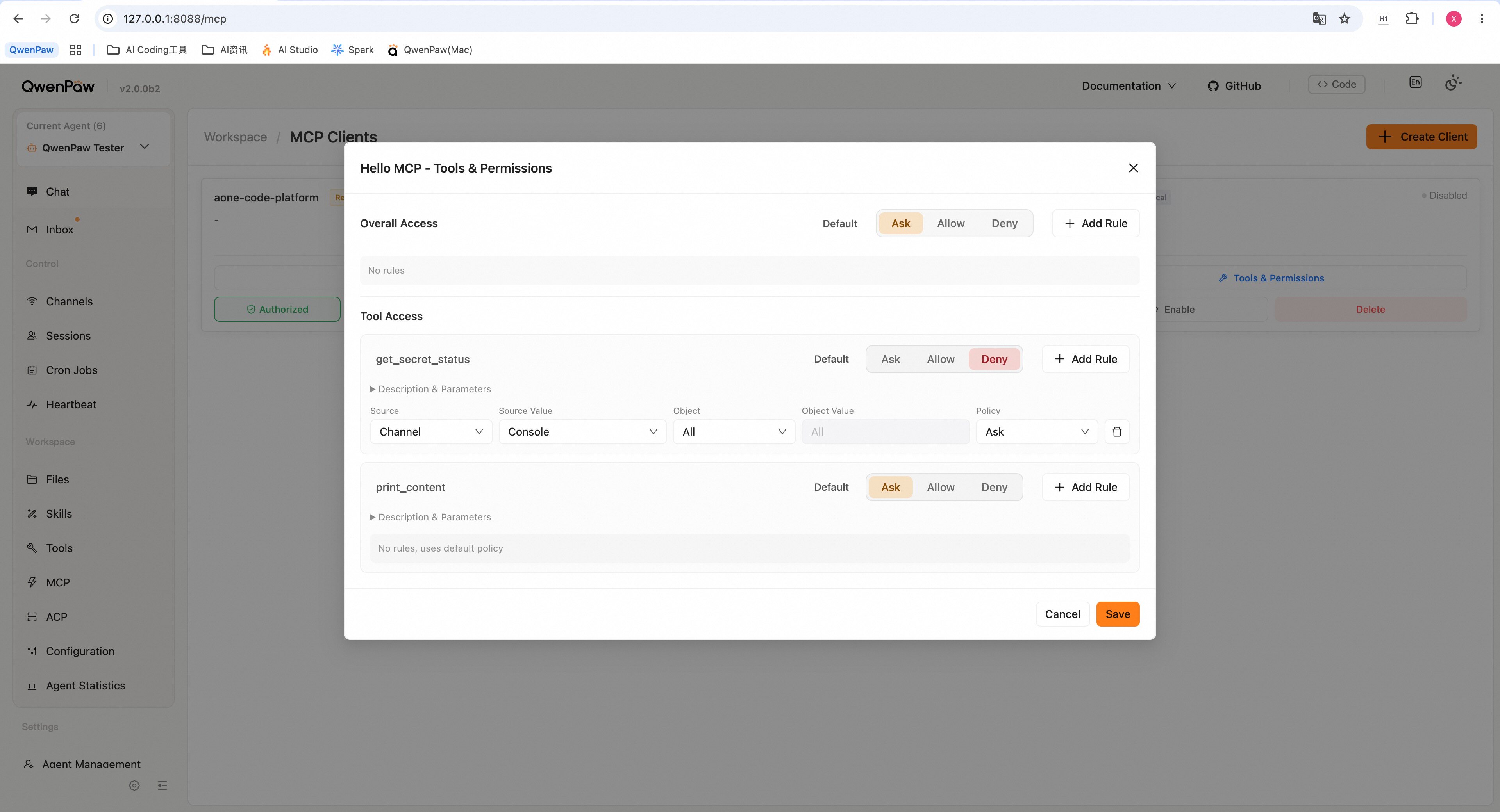
In the Console under **Agent → MCP**, click **Tools & Access** on any MCP client card to open the Access Policy panel:
|
||
|
||
|
||
|
||
- **Set default effect** — Choose the client-wide default: Ask (yellow), Allow (green), or Deny (red)
|
||
- **Add client-level rules** — Override the default for specific sources or users:
|
||
- Select a source channel (Console, DingTalk, Telegram, etc.)
|
||
- Optionally restrict to a specific user
|
||
- Set the effect for that source/user combination
|
||
- **Per-tool defaults** — Set a different default effect for individual tools
|
||
- **Per-tool rules** — Override per-tool defaults with source/user-specific rules
|
||
- **Save** — Click "Save" to persist; **changes take effect immediately without restart**
|
||
|
||
> **Note**: Rules created via YAML that use advanced subject patterns (e.g., `user:admin`, `session:xxx`) are preserved but not editable from the Console. The modal shows an "unmanaged rules" count when such rules exist.
|
||
|
||
---
|
||
|
||
## Complete Configuration Example
|
||
|
||
Here's a complete `config.json` with all security features configured:
|
||
|
||
```json
|
||
{
|
||
"security": {
|
||
"tool_guard": {
|
||
"enabled": true,
|
||
"guarded_tools": null,
|
||
"denied_tools": ["execute_shell_command"],
|
||
"custom_rules": [
|
||
{
|
||
"id": "CUSTOM_DANGEROUS_PATTERN",
|
||
"tools": ["write_file"],
|
||
"params": ["content"],
|
||
"category": "data_exfiltration",
|
||
"severity": "HIGH",
|
||
"patterns": ["secret_key.*=", "password.*="],
|
||
"description": "Detect hardcoded secrets in file content",
|
||
"remediation": "Use environment variables or secret management"
|
||
}
|
||
],
|
||
"disabled_rules": ["TOOL_CMD_PROCESS_KILL"]
|
||
},
|
||
"file_guard": {
|
||
"enabled": true,
|
||
"sensitive_files": [
|
||
"~/.ssh/",
|
||
"~/.qwenpaw.secret/",
|
||
"/etc/passwd",
|
||
"/etc/shadow",
|
||
".env",
|
||
"secrets/"
|
||
]
|
||
},
|
||
"skill_scanner": {
|
||
"mode": "warn",
|
||
"timeout": 30,
|
||
"whitelist": []
|
||
}
|
||
}
|
||
}
|
||
```
|
||
|
||
**Notes**:
|
||
|
||
- Configuration changes take effect immediately for most settings (no restart required)
|
||
- Environment variables override config file values (see each section for details)
|
||
- For Docker deployments, mount your config at `/app/working/config.json`
|
||
|
||
---
|
||
|
||
## Web Authentication
|
||
|
||
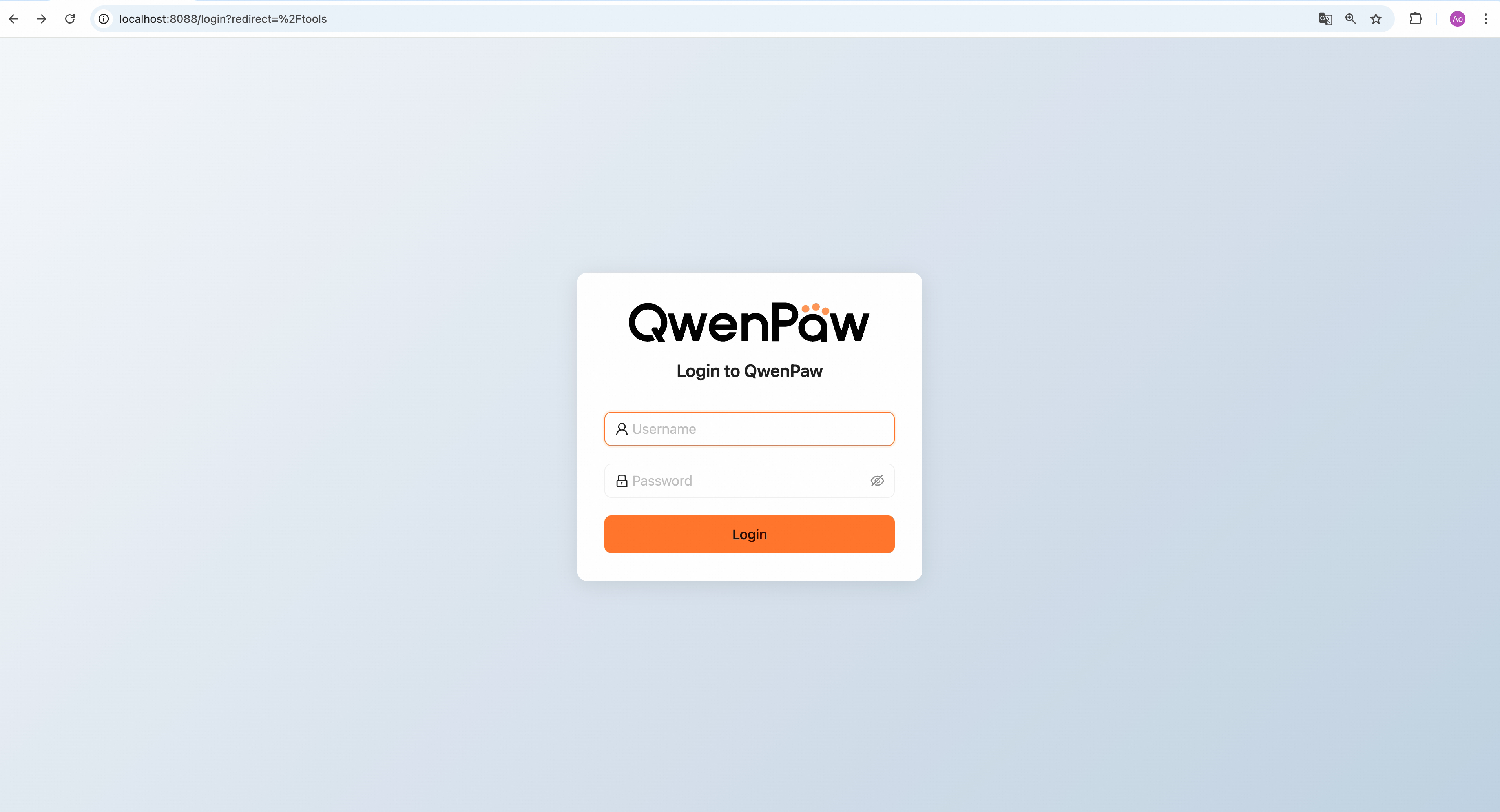
QwenPaw supports optional web login authentication to protect the Console from unauthorized access. Authentication is **disabled by default** and must be explicitly enabled via the `QWENPAW_AUTH_ENABLED` environment variable.
|
||
|
||
|
||
|
||
### How it works
|
||
|
||
1. **Enable authentication** — Set `QWENPAW_AUTH_ENABLED=true` and start QwenPaw
|
||
2. **Registration flow**:
|
||
- On first visit, the Console shows a **registration page**
|
||
- Create the single admin account (username + password)
|
||
- System uses single-user mode, designed for personal use
|
||
3. **Login flow**:
|
||
- After registration, subsequent visits show the **login page**
|
||
- After entering credentials, a signed token is generated (valid for 7 days)
|
||
- Token is stored in browser localStorage and automatically attached to all API requests
|
||
4. **Auto-registration** (optional):
|
||
- Set `QWENPAW_AUTH_USERNAME` and `QWENPAW_AUTH_PASSWORD` environment variables
|
||
- QwenPaw automatically creates the admin account on startup, skipping web registration
|
||
- Useful for Docker, Kubernetes, server management panels, and other automated deployments
|
||
5. **Localhost bypass** — Requests from localhost (`127.0.0.1` / `::1`) automatically skip authentication; CLI commands (`qwenpaw app`, `qwenpaw chat`, etc.) work without a token
|
||
|
||
**Security features**:
|
||
|
||
- Password stored as salted SHA-256 hash, no plaintext stored
|
||
- HMAC-SHA256 signed tokens with 7-day auto-expiry
|
||
- Uses only Python standard library (`hashlib`, `hmac`, `secrets`), no external dependencies
|
||
- `auth.json` file protected with `0o600` permissions (owner read/write only)
|
||
|
||
### Environment variables
|
||
|
||
| Variable | Description | Required |
|
||
| ----------------------- | -------------------------------------------- | -------- |
|
||
| `QWENPAW_AUTH_ENABLED` | Set to `true` to enable authentication | **Yes** |
|
||
| `QWENPAW_AUTH_USERNAME` | Pre-set admin username for auto-registration | Optional |
|
||
| `QWENPAW_AUTH_PASSWORD` | Pre-set admin password for auto-registration | Optional |
|
||
|
||
### Auth-bypass host whitelist
|
||
|
||
In `config.json`, the `security.allow_no_auth_hosts` field specifies client IP addresses that can access API endpoints without authentication, even when authentication is enabled:
|
||
|
||
```json
|
||
{
|
||
"security": {
|
||
"allow_no_auth_hosts": ["127.0.0.1", "::1"]
|
||
}
|
||
}
|
||
```
|
||
|
||
| Field | Type | Default | Description |
|
||
| --------------------- | ------------- | ---------------------- | ------------------------------------------------------------------------------------ |
|
||
| `allow_no_auth_hosts` | array[string] | `["127.0.0.1", "::1"]` | Client IP addresses allowed to access `/api/*` routes without authentication tokens. |
|
||
|
||
This can also be managed from the Console under **Settings → Security**.
|
||
|
||
> **Security warning**: Adding non-localhost addresses to this list means those IPs can access the full API without credentials. Use with caution and only for trusted hosts on private networks.
|
||
|
||
**Configuration notes**:
|
||
|
||
- `QWENPAW_AUTH_ENABLED=true` is the only required variable to enable authentication
|
||
- `QWENPAW_AUTH_USERNAME` and `QWENPAW_AUTH_PASSWORD` are used together:
|
||
- Both set → Auto-creates admin account on startup (for automated deployments)
|
||
- Not set or only one set → Register via web UI on first visit (interactive deployments)
|
||
- If a user is already registered, auto-registration environment variables are ignored
|
||
|
||
### Enable authentication
|
||
|
||
#### Script install / pip install
|
||
|
||
Set environment variables before starting:
|
||
|
||
**Linux / macOS:**
|
||
|
||
```bash
|
||
# Basic enable (web registration)
|
||
export QWENPAW_AUTH_ENABLED=true
|
||
qwenpaw app
|
||
|
||
# Or: Auto-registration mode
|
||
export QWENPAW_AUTH_ENABLED=true
|
||
export QWENPAW_AUTH_USERNAME=admin
|
||
export QWENPAW_AUTH_PASSWORD=mypassword
|
||
qwenpaw app
|
||
```
|
||
|
||
To make it permanent, add the `export` lines to your `~/.bashrc`, `~/.zshrc`, or equivalent.
|
||
|
||
**Windows (CMD):**
|
||
|
||
```cmd
|
||
set QWENPAW_AUTH_ENABLED=true
|
||
rem Optional: auto-registration
|
||
rem set QWENPAW_AUTH_USERNAME=admin
|
||
rem set QWENPAW_AUTH_PASSWORD=mypassword
|
||
qwenpaw app
|
||
```
|
||
|
||
**Windows (PowerShell):**
|
||
|
||
```powershell
|
||
$env:QWENPAW_AUTH_ENABLED = "true"
|
||
# Optional: auto-registration
|
||
# $env:QWENPAW_AUTH_USERNAME = "admin"
|
||
# $env:QWENPAW_AUTH_PASSWORD = "mypassword"
|
||
qwenpaw app
|
||
```
|
||
|
||
#### Docker
|
||
|
||
Pass environment variables with `-e` (recommended with auto-registration):
|
||
|
||
```bash
|
||
docker run -e QWENPAW_AUTH_ENABLED=true \
|
||
-e QWENPAW_AUTH_USERNAME=admin \
|
||
-e QWENPAW_AUTH_PASSWORD=mypassword \
|
||
-p 127.0.0.1:8088:8088 \
|
||
-v qwenpaw-data:/app/working \
|
||
-v qwenpaw-secrets:/app/working.secret \
|
||
-v qwenpaw-backups:/app/working.backups \
|
||
agentscope/qwenpaw:latest
|
||
```
|
||
|
||
> **Tip**: To skip auto-registration, remove `QWENPAW_AUTH_USERNAME` and `QWENPAW_AUTH_PASSWORD` and register via browser on first visit.
|
||
|
||
#### docker-compose.yml
|
||
|
||
```yaml
|
||
services:
|
||
qwenpaw:
|
||
image: agentscope/qwenpaw:latest
|
||
ports:
|
||
- "127.0.0.1:8088:8088"
|
||
environment:
|
||
- QWENPAW_AUTH_ENABLED=true
|
||
- QWENPAW_AUTH_USERNAME=admin
|
||
- QWENPAW_AUTH_PASSWORD=mypassword
|
||
volumes:
|
||
- qwenpaw-data:/app/working
|
||
- qwenpaw-secrets:/app/working.secret
|
||
- qwenpaw-backups:/app/working.backups
|
||
```
|
||
|
||
#### Environment file (.env)
|
||
|
||
You can also use a `.env` file:
|
||
|
||
```
|
||
QWENPAW_AUTH_ENABLED=true
|
||
QWENPAW_AUTH_USERNAME=admin
|
||
QWENPAW_AUTH_PASSWORD=mypassword
|
||
```
|
||
|
||
Then pass it to Docker with `--env-file .env`, or source it in your shell before running `qwenpaw app`.
|
||
|
||
### Disable authentication
|
||
|
||
Remove or unset the environment variable and restart QwenPaw:
|
||
|
||
```bash
|
||
# Linux / macOS
|
||
unset QWENPAW_AUTH_ENABLED
|
||
qwenpaw app
|
||
|
||
# Docker — simply remove the -e flag. The example below includes volumes for persistence.
|
||
docker run -p 127.0.0.1:8088:8088 -v qwenpaw-data:/app/working -v qwenpaw-secrets:/app/working.secret -v qwenpaw-backups:/app/working.backups agentscope/qwenpaw:latest
|
||
```
|
||
|
||
### Password reset
|
||
|
||
If you forget your password, use the CLI to reset:
|
||
|
||
```bash
|
||
qwenpaw auth reset-password
|
||
```
|
||
|
||
This command will:
|
||
|
||
1. Display the current registered username
|
||
2. Prompt for a new password (hidden input, requires confirmation twice)
|
||
3. Rotate the session signing secret (the key stored in `auth.json`), which **invalidates all existing sessions** — all logged-in devices must log in again with the new password
|
||
|
||
**Docker deployments**:
|
||
|
||
```bash
|
||
docker exec -it <container_name> qwenpaw auth reset-password
|
||
```
|
||
|
||
**Alternative approach**:
|
||
|
||
To completely reset the authentication system:
|
||
|
||
```bash
|
||
# Delete the auth file
|
||
rm ~/.qwenpaw.secret/auth.json # or $WORKING_DIR.secret/auth.json
|
||
# Restart QwenPaw; re-register on next visit
|
||
qwenpaw app
|
||
```
|
||
|
||
### Logout
|
||
|
||
Click the **Logout** button at the bottom of the sidebar in the Console:
|
||
|
||
- Clears the token from browser localStorage
|
||
- Automatically redirects to the login page
|
||
- Requires re-entering credentials to access
|
||
|
||
**Automatic logout**:
|
||
|
||
- Token expires (after 7 days)
|
||
- Token becomes invalid (password reset or signing secret rotation)
|
||
- Server returns 401 unauthorized response
|
||
|
||
### Security details
|
||
|
||
| Feature | Detail |
|
||
| --------------------- | ------------------------------------------------------------------------------------------ |
|
||
| Password storage | Salted SHA-256 hash in `auth.json` (no plaintext stored) |
|
||
| Token format | HMAC-SHA256 signed payload, 7-day expiry |
|
||
| Token storage | Browser localStorage, cleared on logout or 401 response |
|
||
| External dependencies | None — uses only Python standard library (`hashlib`, `hmac`, `secrets`) |
|
||
| File permissions | `auth.json` written with `0o600` (owner read/write only) |
|
||
| Localhost bypass | Requests from `127.0.0.1` / `::1` skip auth (CLI access unaffected) |
|
||
| CORS preflight | `OPTIONS` requests pass through without auth check |
|
||
| WebSocket auth | Token passed via query parameter, restricted to upgrade requests only |
|
||
| Protected routes | Only `/api/*` routes require authentication |
|
||
| Public routes | `/api/auth/login`, `/api/auth/register`, `/api/auth/status`, `/api/version`, static assets |
|